Problem
Instead of provisioning directly to the application, a manual workitem is being generated

Anyone faced this issue recently?
Thank you!
@suraj_gorle Where is that option? I don’t see that option. Could you help me with navigation?
Hi @officialamitguptaa ,
You have to go to sources and open that target source that you are working on, go to the base configuration, you will see the last option called Enable, if it is enabled then the source supports provisioning , if it is not enabled, then the source remains as read only.
Thank you
Hi @officialamitguptaa ,
Go to Base Configuration of source and enable provisioning option. Post that request for user and check still manual task is getting created or not. Let us know the update.
Hi @officialamitguptaa , for Web service SaaS application also, you have the enable provisioning option
If you are creating the source newly, then at the top you will see that it is read only and in base configuration you can see the enable provisioning option.
@BhanuK1 Is it a demo tenant?
Hi @ssowmya567 ,
yes it is demo tenant
@BhanuK1 When I tried to configure web service connector, even I couldn’t find that enable provisioning option in base configuration. Am I missing anything here?
@ssowmya567 Are you using Web service Saas connector, Make sure you choose the below one
@BhanuK1 I selected the same
Your source is created as a Direct Connection (read-only), while mine is a Deep Governance Web Services source which supports provisioning. That’s why ‘Enable Provisioning’ is not visible in your tenant.
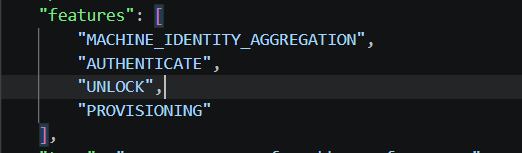
To confirm, can you send the response of this specific source using API from postman, and check if you have Provisioning in the features like below
@BhanuK1 I could only see the following features for my source
@ssowmya567 , Try to open the source in vs code and add the “PROVISIONING” feature to the features list
@BhanuK1 okay, let me try. Just wanted to check, do we need to add the provisioning feature manually for each source every time? Is there any way to have it configured automatically?
@BhanuK1 I tried this with the AD connector. Initially, it was read-only; however, after adding “PROVISIONING” to the features, provisioning worked without created manual task(though the enable provisioning option not appeared in the UI).
Just wanted to check if there is a way to have this enabled automatically for all sources, instead of adding it manually each time.
@ssowmya567 Even though in the UI configuration, you were not able to see the enable provisioning option, just try to request for some access of this application from request center and check if manual work item is getting created or not
@BhanuK1 After adding “PROVISIONING” to the features, the manual work item is not getting created. Also, I currently need to add this manually for all sources. Is there any workaround or way to enable this by default?