Account aggregation filter string

Hi All,

We recently updated the account.filterString in one of our web service sources. Previously, it was:

!(market == "ABC")

This worked fine for including ABC users.

Due to an organizational change, we now need to include users from market “ABC” OR business unit “BU1244”. We tried using:

!(market == "ABC" || businessUnit == "BU1244")

However, this seems to exclude both ABC and BU1244 users, which is not what we intended.

To include both, we believe the correct filter should be:

(market == "ABC" || businessUnit == "BU1244")

Any guidance would be appreciated.

Thanks!

Hello, what connector is this for?

E.g. if the connector is Workday, then the filter actually excludes accounts if the criteria is met.

I remember in the past that group negation didn’t work as expected in the case when I wanted group inclusion, so had to go by “!=" on each attribute.

Can you try (market != "ABC" || businessUnit != "BU1244") or (market != \"ABC\" || businessUnit != \"BU1244\") ?

You need to AND your NOT statements, ie NOT market is ABC AND NOT businessunit is BU1244

Hey @markomanium
I did try this earlier only. It doesn’t seem to fetch any accounts

Hey
sorry i didnt get you!

Can you show us the whole filter in case this is only a part you want to change? (mask any sensitive data)

The filter string filters out the accounts, which means any account that satisfies the condition will be excluded during aggregation.

Try this

(market != “ABC” || businessUnit != “BU1244”)

You want something like:

(market != “ABC” && businessUnit != “BU1244”)

ie filter those accounts where the market does not match ABC and the businessUnit does not match BU1244

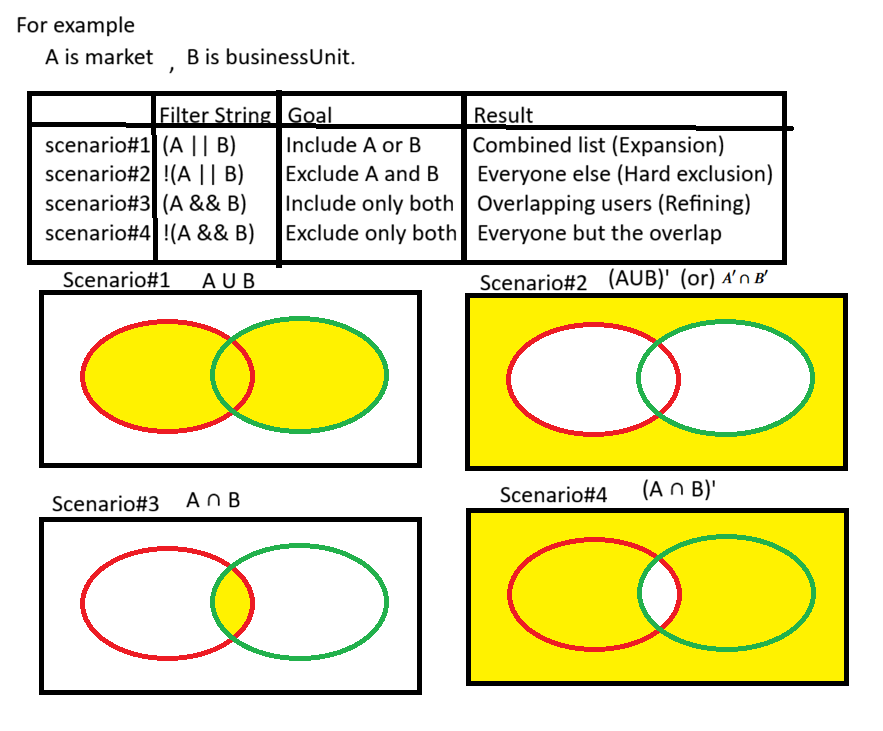
Let me explain through venn diagram for better understanding. I hope this clarifies your doubt.

Now tell me what is your Goal in terms of venn diagram, so we can help with exact filter condition.

Scenario#5

The filter would look like this: ((market == "ABC" || businessUnit == "BU1244") && !(market == "ABC" && businessUnit == "BU1244"))

Scenario#2 is exactly what @j_place filter condition does and the correct representation in terms of filter condition is (market != “ABC” && businessUnit != “BU1244”)

note: use light theme image in the browser.

2 Likes

Alternate option: As you are using a web service source, consider filtering the required values directly in the account aggregation API (if your API supports it) instead of relying on source config filters and this will also help improve the aggregation performance.

2 Likes

I suggested that too, and OP says it doesn’t work. I’m wondering what else could be the problem..

@iamnithesh and @markomanium if you use the NOT on the predicate expressions you need an AND

The OP expression:

should work if ISC honoured the parentheses in a classic Boolean way, but I’m not sure it does, hence my suggestion above.

I believe

!((market == “ABC”) || (businessUnit == “BU1244”))

should also work

1 Like

Hi @Soundary ,

Have you tried this,

((market != "ABC") && (businessUnit != "BU1244"))

Hello @Soundary
I would recommend you using this documentation to get this handled, as per the doc the things matching the filter will be skipped from being brought into ISC.
IdentityNow Account Filtering during Account Aggregation - Compass .
So, as per the same I would recommend below operations, either of them should work:

Option 1:

(market != “ABC“) || (businessUnit != “BU1244“)
So the subsequent API call payload should look something like this for the value component: “(market != \“ABC\“) || (businessUnit != \“BU1244\“)”

Option 2:

!(market == “ABC“) || !(businessUnit == “BU1244“)
So the subsequent API call payload should look something like this for the value component: “!(market == \“ABC\“) || !(businessUnit == \“BU1244\“)”

Thank You

1 Like

Option#3

!(market == "ABC") || (businessUnit == "BU1244")

Composite Filter: Grouping

component: "!(market == \"ABC\") || (businessUnit == \"BU1244\")"

This topic was automatically closed 60 days after the last reply. New replies are no longer allowed.