Role Managment - UI Customization

Which IIQ version are you inquiring about?

Version 8.5

Requirement

Customization of the view for business functions in the list of permitted roles. The column with the IT role type must be removed and replaced with two additional columns with the attributes “Classifications” and “Criticality” (Extension Attribute). I have checked in various jsf and js file to find the way to inject via plugins or direct changes, its not help full looking for your advice or guideance.

Regards,

Kannan

I have added the columns in the Direct Entitlements, Inherited Roles, Permitted Roles and Required Roles from roleReadOnlyView.js, however not able to get the values, is anyone havea idea?

var roleReferenceGridPanelConfig = {
    	xtype: 'gridpanel',
    	prefix: config.prefix,
        title: config.title,
        id: config.prefix + config.type + 'GridPanel',
        collapsible: true,
        collapsed: true,
        hidden: true,
        store: roleReferenceGridDataStore,
        cls : 'smallFontGrid wrappingGridCells',
        columns: [
            { dataIndex: 'name', header: '#{msgs.name}', flex: 2, sortable: true, renderer: SailPoint.grid.Util.renderIiqElevatedAccess },
            //{ dataIndex: 'roleType', header: '#{msgs.type}', flex: 1, sortable: true }, //Added Commented as per requirement
            { dataIndex: 'description', header: '#{msgs.description}', flex: 5, sortable: false },
            { dataIndex: 'classifications', header: '#{msgs.role_simple_entitlement_classification_header}', flex: 3, sortable: false, renderer: 'htmlEncode' }, //Added classification
		    { dataIndex: 'roleCriticality', header: '#{msgs.attr_criticality}', flex: 3, sortable: false, renderer: 'htmlEncode' } //Added Criticality			
        ],
        viewConfig: {
        	emptyText: '#{msgs.role_viewer_roles_unavailable}'
        },
        bbar: [
            Ext.create('SailPoint.ExtendedPagingToolbar', {
                store: roleReferenceGridDataStore,
                displayInfo: false,
                paramBuilder: config.paramBuilder
            })
        ]
    };
	

what exactly you required, I am still not clear. Your requirement is still unclear, what i understand is that you need to create two extended attribute in the role page. But where exactly you need??

@naveenkumar3 The requirement is to Add/Remove the column from the

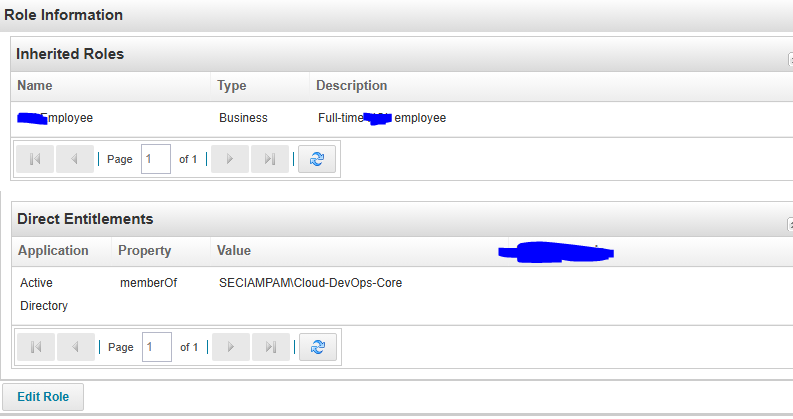
  • Direct Entitlements - I have renamed the default column “Classification” to “SoD-Kategorie”. Additionally, I introduced a new column titled “Criticality”, sourced from an ExtendedAttribute. While the column structure has been successfully added to the UI, the values for “Criticality” are currently not populating — this is the issue I’m currently facing and need a advise to resolve. Screenshots given below for your reference.

  • Permitted Roles - Same “Classification” as “SoD-Kategorie” and “Criticality”

  • Inherited Roles - Same “Classification” as “SoD-Kategorie” and “Criticality”

  • Required Roles - Same “Classification” as “SoD-Kategorie” and “Criticality”

can you try below steps, and see if it works for you??

Step 1: Verify ExtendedAttribute Configuration

First, ensure the ExtendedAttribute is properly configured:

Verify the attribute exists on the actual objects:

  • Navigate to Debug > Object Browser
  • Search for a role/entitlement that should have the Criticality value
  • Check if the extended attribute is present and has a value

Step 2: Update UI Configuration Files

For Roles tabs (Permitted/Inherited/Required):

<! bundle.xml -->

<ColumnConfig field="extendedAttributes.criticality"

header="Criticality"

property="extendedAttributes.criticality"

renderer="sailpoint.web.lcm.RoleColumnRenderer"

sortable="true"/>

Step 3: Custom Column Renderer (If Needed)

create a custom render class

Step 4: check and update uiconfig object

UIConfig object:

<UIConfig name="identityEntitlementsColumns">
    <Attributes>
        <List name="columns">
            <ColumnConfig field="displayName" header="Name"/>
            <ColumnConfig field="classification" header="SoD-Kategorie"/>
            <ColumnConfig field="extendedAttributes.criticality" 
                          header="Criticality" 
                          property="extendedAttributes.criticality"/>
        </List>
    </Attributes>
</UIConfig>

Step 5: Data Population Script

If the extended attribute isn’t automatically populated, you might need a rule to populate it:

Step 6: Clear Cache and Restart

Unfortunetly, this not a right solution and seems wrong information what you have provided in Step 2, Step 4 I dont know where you find this idea. – there is no such file identityRoles.xml or bundleListColumns.xml in SailPoint IIQ.

@Remold - Is there any chance that you are worked in UI Customization?