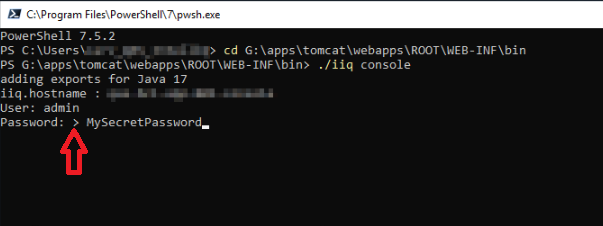
I recently updated IIQ to version 8.5 and I’m noticing a modified behavior from the IIQ console. I’m wondering if anyone else is seeing this. It now shows the password on login, which I consider to be a bug.
What is the correct behavior?
Previously the password was hidden.
What product feature is this related to?
The IIQ console
What are the steps to reproduce the issue?
In IIQ 8.5, installed on Windows, open Powershell 7.5.2 and login to the IIQ console.
Do you have any other information about your environment that may help?
I believe this is not a bug; he is already connected to the iiq console. As indicated by the > character in his screenshot, he has successfully established a console connection.
Trying the list or about command would clarify the situation.
Note: The screenshot clearly shows the user is already connected to the iiq console. He appears to be mistakenly interpreting the prompt as a request for a password, rather than as an interface for entering console commands.
The > symbol, followed by a space, confirms that the console connection has been established."
This issue definitely still persists, and I can reproduce it across multiple environments.
I’ve retested using different Java versions and noticed some differences. The issue does not occur with Java Temurin 17.0.16+8, but it seems to begin with version Temurin 21.0.8+9.
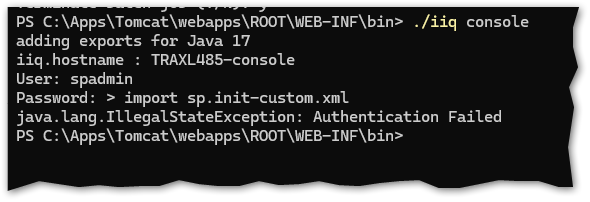
I understand your comment suggesting that I might be misinterpreting the prompt as a password request, but that’s not the case. It genuinely asks for a password, and if I enter anything else, authentication fails. However, authentication succeeds when I provide the correct password.