Share all details about your problem, including any error messages you may have received.
Despite having all required extended attributes correctly defined in the HBM file and matching schema present in the database, IdentityIQ still throws an ObjectConfig error when attempting to load the mappings via the UI.
Has anyone encountered this issue before or found a workaround for resolving ObjectConfig mismatches in 8.4P2?
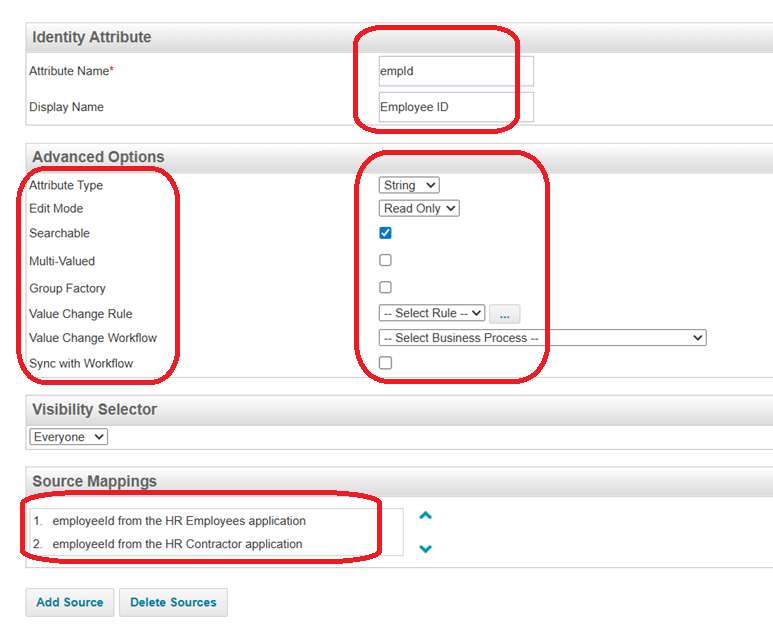
Sailpoint don’t auto sync the identity mappings . If you are defining the extended attributes , You would have to update the identity Mappings(Object Config->Identity) as well .
This is one time task we need to define and update the source mappings from Identity Mappings page after defining Authoritative sources and there is lot more to set for the each attribute properties as shown below which is as per design:
Hello @bikashagarwalla1 after adding the required extended attributes in the hbm file, you must run the extendedSchema command in iiq console.
This command is used to generate the necessary database schema (DDL) scripts to incorporate the new extended attributes into the existing IdentityIQ database tables. It ensures that the database structure is updated to match the modified object definitions configured in the hbm file.
@santhirajumunganda , This is correct in case he adds the extended attributes after iiq schema generation. But, as per his screenshot, it seems he has already taken care of this, so it is not required to run extendedSchema until further changes in the HBM files.