Could not resolve property: initials of: sailpoint.object.Identity

I encountered the following error while running the identity refresh:

could not resolve property: initials of: sailpoint.object.Identity

Suddenly this issue is stared. After investigation issue is have check the identity mapping and this attribute is missing, I have created the mapping attribute. but still getting same error.

Additionally, after adding the attributes to the identity mapping, this error appears(
IdentityExtended.hbm.xml is missing a named column maping for attribute initials). I validated the identity.hbm file for both Production and UAT environments, Look like both hbm files and identity Object config are same.


Prod


UAT

The extendedNumber is different.

Did you research why the mapping was deleted? it would be wise to prevent it from happening again.

Hi Jasper,

That extendedNumber is already in use that’s what the system take another one.

Yes, I’m doing research on that part.

Thanks!

Hi @GutteStolt ,

By default we will map 10 extended attributes, but this may be raised to
a maximum of 20. Using ExtendedPropertyAccessor can add attributes beyond the limit of 20 and have meaningful names.

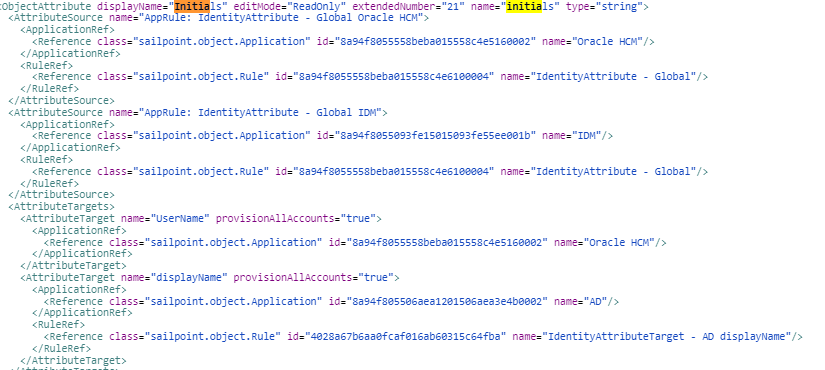
In the production environment, the “Initials” attribute is set with extendedNumber="1", but in the UAT environment, it is set to 21, which is incorrect. If you need to extend the attribute beyond the limit, you can add the following entry to the IdentityExtended.hbm.xml file.

<property name="Initials" type="string" length="450"
          access="sailpoint.persistence.ExtendedPropertyAccessor"
          index="spt_identity_Initials_ci"/>

Hi @Arun-Kumar,

After adding this entry do i need to run any DB query? to reflect this column in DB?

Thanks

Hi @GutteStolt ,
Execute the IIQ extendedSchema to generate the DDL script file. Then, run that script on your database.

[IdentityIQ installation directory]/WEB-INF/bin>iiq extendedSchema

Remove the extendedNumber=“21” from objectConfig and add namedColumn=“true”


<ObjectAttribute displayName="Intitials" editMode="ReadOnly" namedColumn="true" name="Intitials" type="string"/>

Hello @Arun-Kumar
now i’m getting this error IdentityExtended.hbm.xml property Initials is not defined in ObjectConfig:Identity.

But i can see this attribute is there in the ObjectConfig identity

As you mentioned i have followed below steps.

  1. Navigated to the bin location and executed this command iiq extendedSchema and below is the output.

  1. Navigated to the WEB-INF\database file checked the recently updated file(add_identityiq_extensions.sqlserver) get the query.

  2. Executed below query

alter table identityiq.spt_identity add initials nvarchar(450) null;
create index spt_identity_Initials_ci on identityiq.spt_identity (initials);

Hi @GutteStolt , if you have created it as named column then update the entry in Identity ObjectConfig, with namedColumn=“true” and remove the entry of extendedNumber=“3”

Also, you can refer this link to know more about extended columns.

Hello @Arpitha1 .

I don’t have any extendedNumber attribute in ObjectConfig :identity

@GutteStolt

Have you kept this namedColumn=“true” ?

@Arpitha1

Check this once

image

@GutteStolt
Did you execute the DB scripts to add this new field in a column?

@GutteStolt It’s in correct format. Have you restarted IIQ Application after DB changes ?

Hello @Arpitha1,

That issue is resolve, but now i’m getting this error message The application script threw an exception: java.lang.NullPointerException BSF info: IdentityAttribute - Global at line: 0 column: columnNo. Before this that is working fine. I not made any changes in this rule.

Thanks

@GutteStolt Can you send your rule code

Rule1.txt (853 Bytes)

Hello @Arpitha1,

Please check the attachment.

Share the code of reference Rule library as well

Hello Sathish,

Rule3.txt (8.3 KB)

As i have made changed in the identity mapping attribute small i to cap I like this name =initials to name=Initials. Is this the causing the issue?

Thanks

@GutteStolt You can keep whatever in displayName, what matters is name. I see ‘initials’ in name value.

Also, I see in your code that you are using your own java class. Have a look in that java code too, also keep import statement for eu.everett.rule.idenityattribute.Global

image

