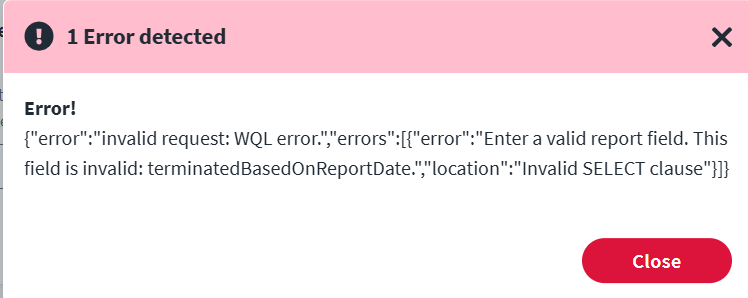
We were performing an integration using “Workday Accounts” connector, But when the aggregation is performed, It is returning an error as shown in the image below. Could you please provide some insight on how to solve this issue. Thank you in Advance.
The error is due to the invalid or non-existent field name terminatedBasedOnReportDate being used in the Workday custom report or identity attribute mapping in the SailPoint Workday connector configuration.
Resolution Steps :
Check the Workday Custom Report (RaaS):
Log in to Workday as an admin.
Go to the Custom Report used for SailPoint integration.
Verify whether the field terminatedBasedOnReportDate:
Exists in the report
Is spelled correctly (case sensitive)
Is exposed as a web service field (RaaS field must be marked as “Web Service Field”)
Check the SailPoint Workday Source Configuration:
Navigate to Identity Security Cloud → Admin → Connections → Sources
Open your Workday Accounts source.
Check the Identity Profile Mappings or Account Schema
Look for the field terminatedBasedOnReportDate and:
Confirm if it’s mapped to a valid field from Workday
Remove or correct it if it doesn’t exist in the Workday report
Test the Report URL Separately :
Use Postman or a browser to open the Workday RaaS URL .
Confirm whether terminatedBasedOnReportDate is returned in the response.
If not, the field is either not included or not web service enabled.
Review Aggregation Logs in SailPoint :
Go to Monitor → IdentityNow Tasks
Review the logs for the aggregation task of the Workday connector.
Look for the full WQL (Workday Query Language) SELECT clause and identify any other invalid fields.
Suggested Fix:
If terminatedBasedOnReportDate is not needed → Remove the field from the attribute mapping or schema in ISC.
If it’s needed → Make sure it exists in the Workday report and is marked as Web Service Field .
To diagnose, can you toggle the “Aggregate Terminated Account” and check your “Termination Offset” to ensure it only includes the number of days of terminated accounts you require.
@narayanag - thank you for your contribution, but it reads very much like an AI generated response which has completely missed the question. Posting AI generated content goes against the purpose of this community. Obviously, apologies if it was not AI generated.
Thank you everyone for responding on what might be the issue here. We passed this error now after making some changes and were facing a new error as below