Entitlement Extended Attributes Not Appearing in Entitlement Search on Access Request Page

Which IIQ version are you inquiring about?

8.4

Please share any images or screenshots, if relevant.

Share all details about your problem, including any error messages you may have received.

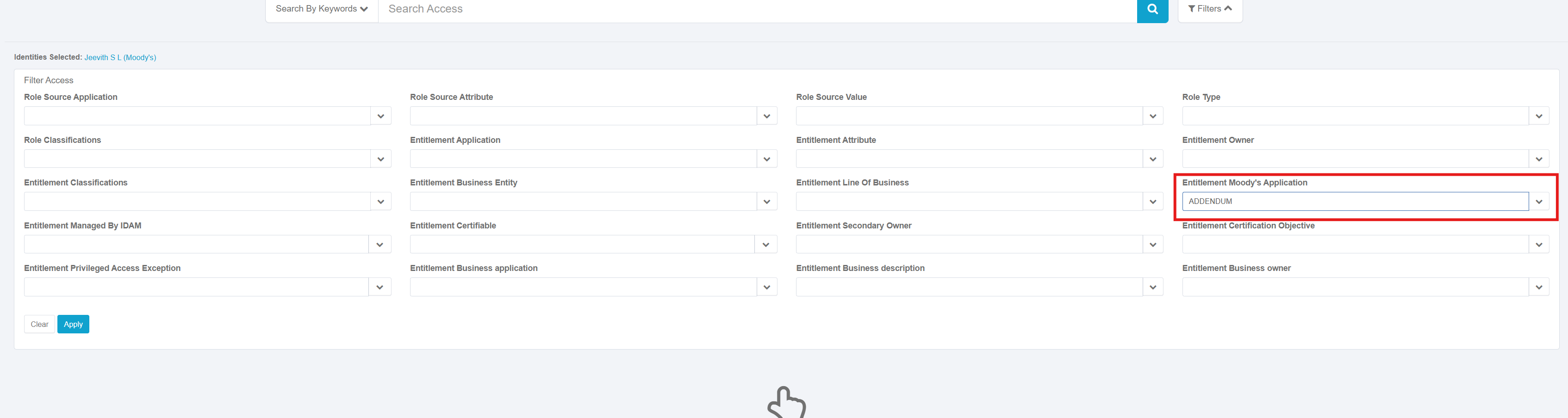
Entitlement Extended Attributes Not Appearing in Entitlement Name Search on Access Request Page.

Filtering on these columns works as expected and returns correct values. However, when I try to search directly using these attributes, no results are returned.
Please advise if additional configuration is needed to enable search indexing or mapping for these extended attributes

Hello @Jeevith18

Try to check In IIQ Debug page → search for EntitlementExtendedAttrConfig object. Custom extended attributes must be defined there, with display=true and searchable=true. Secondly try to run Full Text Index Refresh task.

You need to edit the FullTextIndex object named BundleManagedAttribute and add those as indexed entries so the values are indexed via the full text index refresh job.

Hi @patrickboston . Thanks for the reply can u provide an example please.

<FullTextField indexed="true" name="moodysApplication"/>
1 Like

Hi @patrickboston ..i did added these

and ran the full text index task that’s also got success yet when i search the entitlement it’s not working please suggest.

Hi @asharma65 I Couldn’t able to get this object in debug page can u provide where i need to look

also i tried with Analyzed as true and Stored = true

@Jeevith18 Try to navigate to systemSetup/managedAttributeConfig.jsf

HI @asharma65 thank you i have those attributes are searchable. yet no luck with the issue

This topic was automatically closed 60 days after the last reply. New replies are no longer allowed.
