Hi, I would like to set up a workflow to automatically approve if the manager submits the request for the reportee.
We know we have ‘autoApprovalEnabled’ configured in the access request configuration, but we don’t want to do it for some reason.
Hi @Manju22 ,
If you have autoApprovalEnabled set to ‘true’, then if the requestor and the reviewer are the same person, the request is auto approved.
If this doesn’t work for you, I would suggest to start looking at a workflow using the Access Request Submitted trigger if you have Adaptive Approvals in your tenant.
If you do not have Adaptive Approvals, then I would suggest looking at creating an Access Request Submitted Event Trigger that will then invoke a workflow with the External Trigger that can then subsequently check if the requestor is the recipient’s manager and approve the access request. I implement this setup for a different use case, but I think the first few steps of my blog post can help you get this trigger setup ( Mandatory Expiration Dates for Access Requests in ISC with Workflows ).
Thank you,
- Zach
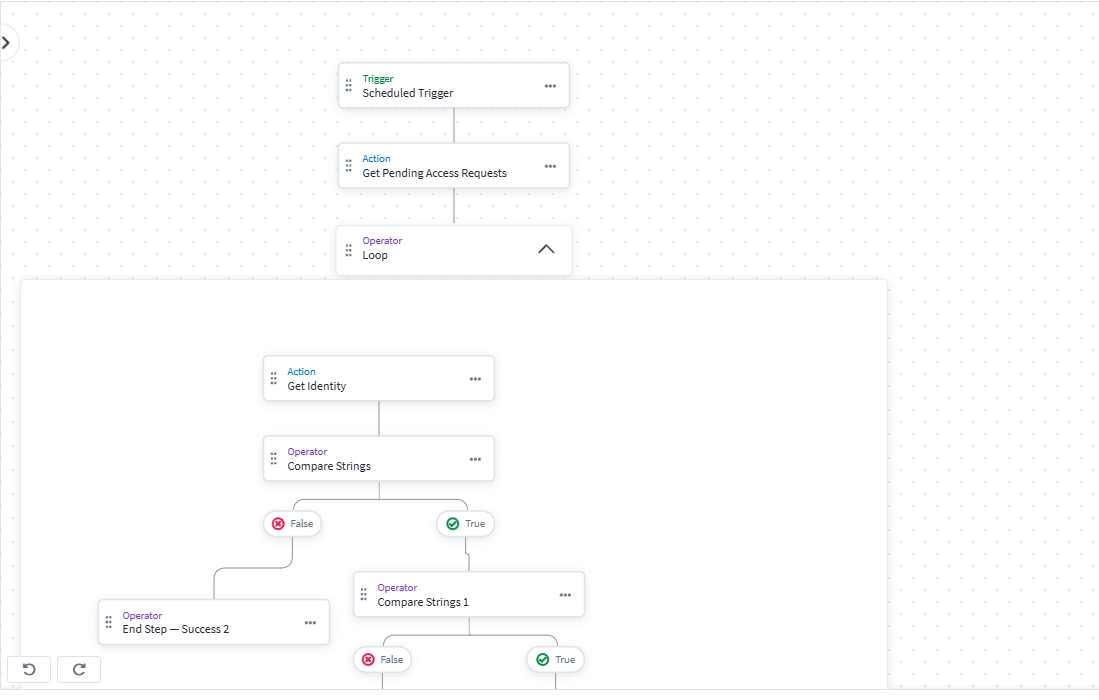
Thanks zach. But I also like to use it without external triggers. So I came up with the idea of using ‘SCHEDULED TRIGGER’ with an action to get pending access requests and create comparison filters to include only manager approval for certain access profiles.
Attached the workflow.
Managerapproval20251127 (1).json (3.3 KB)
can you use Event trigger instead? https://developer.identitysoon.com/idn/docs/event-triggers/triggers/access-request-preapproval/index.html
If that works for you and your use case, then it sounds like a good solution!
I would just note that the schedule only runs every 30 minutes so the requests could be approved by whomever the initial approver is during that time before this workflow can check and auto-approve the request.
Additionally, be aware of the loop limits. Since this workflow is getting all pending access requests each time, if there are more than 250 pending access requests being passed into the loop, the workflow will fail and no checks or approvals will occur.

You could create a new account/identity on the IdentityNow Admins source and use that as a service account. Call it something like “ISC Automation”, log into it, grant it the necessary user level, and make it the owner of the workflow. This way its name will appear instead of yours and the workflow won’t be tied to your identity specifically.