I’m setting up the OAuth authorization flow between ServiceNow Service Catalog and SailPoint ISC, following the official documentation: User Account Configuration
Steps completed:
Created an API Client in ISC (Authorization Code + Refresh Token grant types, scope sp:scopes:all, redirect URL set to the ServiceNow instance)
Configured the OAuth provider/consumer settings in ServiceNow (Authorization URL, Token URL, Client ID/Secret, Redirect URL)
Issue:
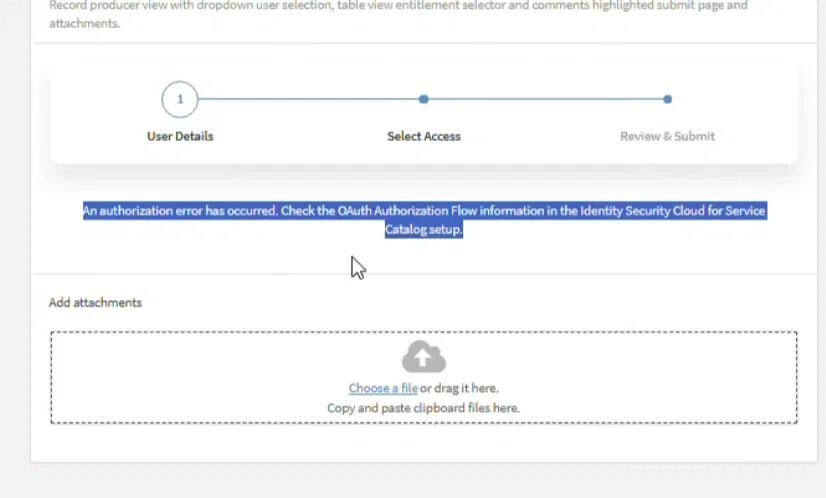
When I navigate to the request page in Service Catalog, I get the following error:
“An authorization error has occurred. Check the OAuth Authorization Flow information in the Identity Security Cloud for Service Catalog setup.”
What could be the reason for this? Do I need to perform any additional steps apart from those mentioned in the document? Also, the ServiceNow admin doesn’t have admin privileges in SailPoint — could that be related to the issue?
Hello Ravi, since this error shows up while opening Manage Access itself, the authorization-code flow isn’t completing. I would focus on the OAuth config rather than correlation or request-side permissions.
I would verify these values exactly:
Redirect URL in both the ISC OAuth client and ServiceNow Application Registry: https://<your-instance>.service-now.com/oauth_redirect.do
“OAuth app name for Authorization code flow” on the Setup page must exactly match the Name of the OAuth provider in ServiceNow Application Registry
Also make sure the two credential sets aren’t mixed up. The ISC OAuth client (Authorization Code + Refresh Token, sp:scopes:all) goes into ServiceNow Application Registry. A separate Personal Access Token generated by an ISC administrator goes into the PAT fields on the Service Catalog Setup page.
The ServiceNow admin doesn’t need ISC admin access just to configure ServiceNow. But the user completing the authorization needs to be able to sign in to ISC, and the user accessing Manage Access needs the x_sap_intidn.userrole in ServiceNow.
Once you have confirmed everything, go to System OAuth > Manage Tokens, revoke the existing token for this provider, and open Manage Access again to kick off a fresh authorization. If it still fails, check ServiceNow’s outbound HTTP logs. The token response will tell you if it’s an invalid_client, redirect URI mismatch, or something else.
Go to ServiceNow > System OAuth > Manage Tokens and check whether an OAuth token exists for the SailPoint provider and your user account. You may need a ServiceNow administrator to check this, since that module is normally admin-only.
If a token is present, open it and select Revoke Access. Then open Manage Access again. This should start a fresh authorization flow and request a new token from ISC.
If no token is present, you can skip this step. It likely means the authorization did not reach the point where ServiceNow successfully stored the token, so I would go back and verify the OAuth URLs, provider name, client ID and secret.