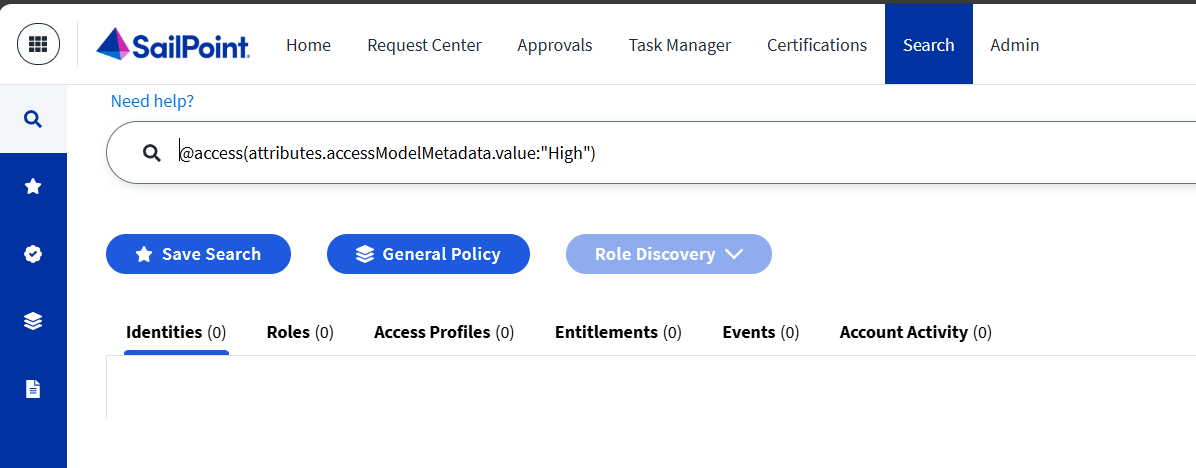
I believe you will have to create a custom report for this outside of ISC. As mentioned above, you cannot directly search for this on identities, as that information is not available.
What you can do is a two tiered search, or combine this in other tooling.
Search 1: Get all roles with a particular metadata attribute value
Search 2: Get all identities that have the role(s) from Search 1
You could create this via the SailPoint SDKs or by directly calling the APIs via other tooling.
This is in text format, but taken directly from my PS script. Takes an hour to run for 3300 identities.
function Get-AccessItemIdentityMapping {
  param (
    [string]$tenant,
    [hashtable]$headers
  )

  # Record the start time for performance tracking
  $startTime = Get-Date
  # Initialize hashtables to store mappings of roles/access profiles to identities
  $roleIdentities = @{}
  $accessProfileIdentities = @{}

  # --- Step 1: Get all Roles and Access Profiles from the Identity Platform ---
  Write-Host "Fetching all Roles..."
  # A hashtable to keep track of processed role names
  $rolesToProcess = @{}
  # Define the query body for fetching roles
  $roleQueryBody = @{
    indices           = @("roles") # Target the 'roles' index
    query             = @{ query = "enabled:true" } # Filter for enabled roles
    queryResultFilter = @{ includes = @("id", "name") } # Only retrieve ID and name
  }
  try {
    # Invoke REST method to search for roles. Limit is set to 4000 to retrieve all roles.
    $roleResponse = Invoke-RestMethod -Uri "https://$tenant.api.identitynow.com/v2024/search?limit=4000" -Method 'POST' -Headers $headers -Body ($roleQueryBody | ConvertTo-Json -Depth 10) -ErrorAction Stop
    Write-Host "Fetched $($roleResponse.Count) roles."
    # Populate rolesToProcess with role names for efficient lookup
    foreach ($role in $roleResponse) {
      $rolesToProcess[$role.name] = $true
    }
  }
  catch {
    # Error handling for role fetching
    Write-Error "Error fetching roles: $($_.Exception.Message)"
    return $null, $null # Return nulls if an error occurs
  }

  Write-Host "Fetching all Access Profiles..."
  # A hashtable to keep track of processed access profile names
  $accessProfilesToProcess = @{}
  # Define the query body for fetching access profiles
  $accessProfileQueryBody = @{
    indices           = @("accessprofiles") # Target the 'accessprofiles' index
    query             = @{ query = "enabled:true" } # Filter for enabled access profiles
    queryResultFilter = @{includes = @("id", "name") } # Only retrieve ID and name
  }
  try {
    # Invoke REST method to search for access profiles. Limit is set to 4000 to retrieve all profiles.
    $accessProfileResponse = Invoke-RestMethod -Uri "https://$tenant.api.identitynow.com/v2024/search?limit=4000" -Method 'POST' -Headers $headers -Body ($accessProfileQueryBody | ConvertTo-Json -Depth 10) -ErrorAction Stop
    Write-Host "Fetched $($accessProfileResponse.Count) access profiles."
    # Populate accessProfilesToProcess with access profile names for efficient lookup
    foreach ($accessProfile in $accessProfileResponse) {
      $accessProfilesToProcess[$accessProfile.name] = $true
    }
  }
  catch {
    # Error handling for access profile fetching
    Write-Error "Error fetching access profiles: $($_.Exception.Message)"
    return $null, $null # Return nulls if an error occurs
  }

  # --- Step 2: Fetch all Identities and their Assigned Access ---
  Write-Host "Fetching all Identities and their assigned Access..."
  # Define the query body for fetching identities with pagination
  $identityQueryBody = @{
    indices           = @("identities") # Target the 'identities' index
    query             = @{
      query = "attributes.cloudLifecycleState:active" # Filter for active identities
      sort  = @(
        @{ field = "id"; order = "asc" } # Sort by ID for consistent pagination
      )
    }
    # Updated to include 'attributes.email' instead of 'attributes.adUsername'
    queryResultFilter = @{includes = @("id", "displayName", "attributes.email", "access.name", "access.type") } # Specify required fields
    offset            = 0 # Starting offset for pagination
    limit             = 300 # Number of identities to fetch per request
  }
  $identitiesProcessedCount = 0 # Counter for processed identities
  $continueIdentities = $true # Flag to control pagination loop

  while ($continueIdentities) {
    Write-Host "Fetching identities... Offset: $($identityQueryBody.offset), Processed: $identitiesProcessedCount"

    try {
      # Invoke REST method to search for identities with pagination
      $identityResponse = Invoke-RestMethod -Uri "https://$tenant.api.identitynow.com/v3/search?offset=$($identityQueryBody.offset)&limit=$($identityQueryBody.limit)" -Method 'POST' -Headers $headers -Body ($identityQueryBody | ConvertTo-Json -Depth 10) -ErrorAction Stop

      # Process each identity in the current response
      foreach ($identity in $identityResponse) {
        $identitiesProcessedCount++
        # Extract the email attribute
        $email = $identity.attributes.email

        # Iterate through known roles and check if the identity has them
        foreach ($roleName in $rolesToProcess.Keys) {
          foreach ($access in $identity.access) {
            # If the access type is 'ROLE' and the name matches a known role
            if ($access.type -ceq "ROLE" -and $access.name -ceq $roleName) {
              # Initialize the array for the role if it doesn't exist
              if (-not $roleIdentities.ContainsKey($roleName)) {
                $roleIdentities[$roleName] = @()
              }
              # Add the email to the role's identity list if available
              if ($email) {
                $roleIdentities[$roleName] += $email
              }
              break # Move to the next role for this identity once found
            }
          }
        }

        # Iterate through known access profiles and check if the identity has them
        foreach ($accessProfileName in $accessProfilesToProcess.Keys) {
          foreach ($access in $identity.access) {
            # If the access type is 'ACCESS_PROFILE' and the name matches a known access profile
            if ($access.type -ceq "ACCESS_PROFILE" -and $access.name -ceq $accessProfileName) {
              # Initialize the array for the access profile if it doesn't exist
              if (-not $accessProfileIdentities.ContainsKey($accessProfileName)) {
                $accessProfileIdentities[$accessProfileName] = @()
              }
              # Add the email to the access profile's identity list if available
              if ($email) {
                $accessProfileIdentities[$accessProfileName] += $email
              }
              break # Move to the next access profile for this identity once found
            }
          }
        }
      }

      # Check if all identities have been fetched (response count less than limit)
      if ($identityResponse.Count -lt $($identityQueryBody.limit)) {
        $continueIdentities = $false # Stop the pagination loop
      }
      # Increment the offset for the next paginated request
      $identityQueryBody.offset += $identityQueryBody.limit

    }
    catch {
      # Error handling for identity fetching
      Write-Error "Error fetching identities: $($_.Exception.Message)"
      $continueIdentities = $false # Stop the loop on error
    }
  }

  Write-Host "Finished processing $identitiesProcessedCount identities."

  # --- Step 3: Prepare data for CSV Export ---
  # Create an array to hold role data for CSV export
  $roleExportData = @()
  foreach ($role in $roleIdentities.Keys) {
    # Get unique emails for the current role and sort them
    $emails = ($roleIdentities[$role] | Sort-Object -Unique)
    $count = $emails.Count # Count of unique users
    $emailsString = $emails -join ";" # Join emails with a semicolon
    # Create a custom object for the CSV row
    $roleExportData += [PSCustomObject]@{
      "Role Name" = $role
      "Count"     = $count
      "Emails"    = $emailsString # Changed column name to 'Emails'
    }
  }

  # Create an array to hold access profile data for CSV export
  $accessProfileExportData = @()
  foreach ($accessProfile in $accessProfileIdentities.Keys) {
    # Get unique emails for the current access profile and sort them
    $emails = ($accessProfileIdentities[$accessProfile] | Sort-Object -Unique)
    $count = $emails.Count # Count of unique users
    $emailsString = $emails -join ";" # Join emails with a semicolon
    # Create a custom object for the CSV row
    $accessProfileExportData += [PSCustomObject]@{
      "Access Profile Name" = $accessProfile
      "Count"               = $count
      "Emails"              = $emailsString # Changed column name to 'Emails'
    }
  }

  # Calculate and display the total time taken for the function
  $endTime = Get-Date
  $timeTaken = $endTime - $startTime
  Write-Host "Function Get-AccessItemIdentityMapping took $($timeTaken.TotalSeconds) seconds to run."

  # Return the two data sets
  return $roleExportData, $accessProfileExportData
}

# This script retrieves role and access profile identity mappings from the IdentityNow API.

## Script Execution Section
# Define your tenant identifier (e.g., "yourtenant")
$Tenant = "yourtenantname"

# Define your Client ID and Client Secret for API authentication.
# **IMPORTANT: In a production environment, avoid hardcoding these values directly in the script.**
# Consider using secure methods like Azure Key Vault, HashiCorp Vault, or PowerShell's SecretManagement module.
$clientID = "YOUR_CLIENT_ID"
$clientSecret = "YOUR_CLIENT_SECRET"

# Function to obtain an OAuth 2.0 access token
function Get-AccessToken {
  param (
    [String]$tenant,
    [String]$clientID,
    [String]$clientSecret
  )
  # Parameters for the REST call to the OAuth token endpoint
  $params = @{
    uri    = "https://$tenant.api.identitynow.com/oauth/token?grant_type=client_credentials&client_id=$($clientID)&client_secret=$($clientSecret)"
    method = "POST"
  }
  # Invoke the REST method and return the access token
  return (Invoke-RestMethod @params).access_token
}

# Get the access token required for subsequent API calls
$token = Get-AccessToken -tenant $tenant -clientID $clientID -clientSecret $clientSecret

# Define the standard HTTP headers for API requests
$headers = @{
  "Content-Type"  = "application/json"
  "Accept"        = "application/json"
  "Authorization" = "Bearer $token" # Include the acquired access token
}

# Execute the main function to retrieve role and access profile identity mappings
$roleReport, $accessProfileReport = Get-AccessItemIdentityMapping -tenant $tenant -headers $headers

# Define the output path for CSV files
# **IMPORTANT: Adjust this path to a location accessible on your system.**
$outputPath = "C:\Temp\IdentityReports"

# Ensure the output directory exists
if (-not (Test-Path $outputPath)) {
  New-Item -Path $outputPath -ItemType Directory -Force | Out-Null
}

# Export Role results to a CSV file
if ($roleReport) {
  # Include a timestamp in the filename to avoid overwriting previous reports
  $roleCsvFilePath = Join-Path $outputPath "Roles_$(Get-Date -Format 'yyyyMMdd_HHmmss').csv"
  $roleReport | Export-Csv -Path $roleCsvFilePath -NoTypeInformation
  Write-Host "Role data exported to $roleCsvFilePath"
}
else {
  Write-Warning "No role data retrieved."
}

# Export Access Profile results to a CSV file
if ($accessProfileReport) {
  # Include a timestamp in the filename to avoid overwriting previous reports
  $accessProfileCsvFilePath = Join-Path $outputPath "AccessProfiles_$(Get-Date -Format 'ddMMyyyy').csv"
  $accessProfileReport | Export-Csv -Path $accessProfileCsvFilePath -NoTypeInformation
  Write-Host "Access Profile data exported to $accessProfileCsvFilePath"
}
else {
  Write-Warning "No access profile data retrieved."
}