We are looking for a way to prevent SailPoint from granting access to accounts that are marked as Terminated or Withdrawn. There have been several incidents where access was mistakenly granted to users who no longer work for our company. Additionally, in scenarios where access was not properly removed after termination, we want to ensure that we can still revoke access from those users.
I found a way to limit which accounts are selectable from the Manage User Access form; however, this also prevents us from selecting a terminated user in order to remove their access.
Hi @PGarza - Are you manually requesting or using assignment criteria?
To prevent auto assignment you would need to add additional criteria to exclude terminated users. For manual requests and removals, you can use the quicklink options under Quicklink populations.
I have configured and set up the Quicklink option under the Quicklink Populations.
However, this prevents us from being able to look up a terminated or withdrawn user to remove access if needed.
For more context: under the “User Onboarding” Quicklink Populations, we have the Quicklinks “Request Access” or also called the “Manage User Access” form. On the first page, you’re asked to select a user to either add or remove access. While we don’t want to grant access to terminated users, we still want the ability to remove their access.
We were considering whether it’s possible to have a default filter pre-configured or a toggle button to search only for active users (possibly with other criteria). This would help prevent accidentally granting access to terminated users. However, we’d like administrators to have the option to manually disable the filter in order to select a terminated user for access removal. I wasn’t able to find a way to implement this.
Another idea I had was to set up a separate Quicklink form specifically for removing access, which would not include the active user filter.
Custom Criteria we are using in case anyone is interested.
Create a new QL Population without the restrictions and add trusted individuals to it, this will override the restrictions on any other QL option.
Delegate the System Administrator capability to a workgroup and add trusted individuals, this will bypass the restrictions on the Identity selector page.
For option 1 you won’t need a new QuickLink, only a new Quicklink population.
As an admin, go to the gear icon, Global Settings and select Quicklink Populations.
Select New and enter a Name/Description. Set the membership to what you want it to be.
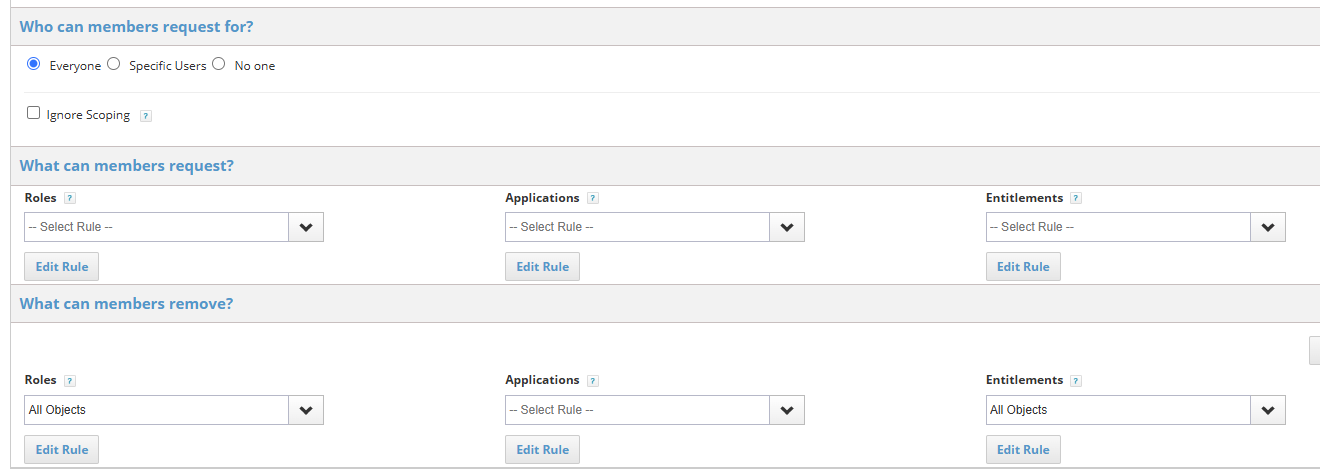
Next, set ‘Who can Members request for’. By selecting everyone and not putting a filter here, members of this QL population will be able to see all users (Even termed).
Finally, make sure to set what they can remove. This will allow members to remove entitlements/roles from terminated users based on your description.
I will mark your response as the solution, and I do agree that it is the simplest and easiest method to address this. However, the main issue is that we don’t trust anyone to verify whether a user was terminated while a request is still open in another ticketing system. (Yes, we are planning to integrate both systems.)