Followed along with some of these postman initial setup links, believe i have my ‘environment’ correct with its variabls for tenant, client id/scrt but upon trying to test getting list of access prof it stated error JWT is required. is my ‘environment’ missing a variable, such as grant type? i ensure i selected the correct environment too, maybe i just missed a step
If you click on the authorization tab in the call you’re making, what do you see?
auth type set to “Inherit auth from parent”, and next to that is “Bearer Token” and the Token field appears to be empty currently
It should have a variable {{accessToken}}
Can you clarify which instructions you followed to set up the environments?
You may need to start over from here:
Postman Collections | SailPoint Developer Community
You’d need to create forks of the current collections, then update the environment(s) to set the tenant, client id, and client secret.
Look at the postman console and ensure an access token is being retrieved. There should be a POST call to the /oauth/token endpoint. Ensure that’s a 200 response.
Often I see in situations like this that people often forget to actually select the environment even though they create one.
Postman console is your friend
- Generate an access token (JWT) by calling the token endpoint:POST https://{tenant}.api.identitynow.com/oauth/token with grant_type=client_credentials, client_id, and client_secret (PATs can be used to generate access tokens this way as well).
- Use that token on your API call by adding:
Authorization: Bearer {access_token}
So: grant_type is required in the token request, but the (JWT is required) error is happening on the Access Profiles call because Postman isn’t sending or isn’t updating the Bearer token on that call.
The collections have a pre-call script that should do this automatically
That’s true, I can relate on not selecting it. @josueblanco Also, before that, make sure that you have your environment in fact “saved“ after defining variables and make sure it’s selected.
all thank you i will go ahead and start from the beginning as i see the link posted has the latest api collections that should help, thank you
Let us know how it goes or if you need further assistance. If it works, please mark this topic as solved.
Thank you!
Hi Josue,
First fork from Postman Collections | SailPoint Developer Community for ISC security cloud after that configure environment variables .

Specify environment variables
====================
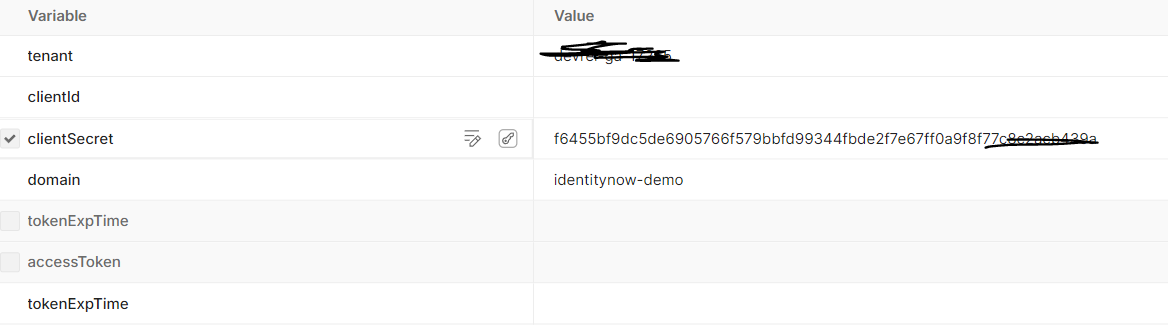
The key as you said: Bearer token is empty while Auth is “Inherit from parent.” That usually means the collection pre-request script isn’t finding the variable names it expects, so {{accessToken}} never gets populated (it’s not an API problem yet — it’s a Postman setup mismatch).
open the request → Headers and check if an Authorization: Bearer … header is actually being sent. If it’s missing/blank, the script didn’t set the token.
the SailPoint collections expect exact environment variable names (tenant/clientId/clientSecret/etc.).
If you created your own env with different names, the script won’t read them and token stays empty. you have to fork the official SailPoint collection and use the env template exactly as-is, then rerun — the token will start populating automatically.
Good morning all, so i see part of an issue. I have the lastest collections. but for some reason the tenant and domain variables in the collection’s baseurl aren’t pulling from my Testing environment. the collection variable is not resolving properly would i need to then add the baseurl directly to my test environment even though sailpoint guidance states not to do so?
Hi @josueblanco ,
I suspect issue with postman set just remove and add collections against while performing fork make sure to also fork environment variables
Just replace the tenant with actual tenant name
Along with client ID secret generated from Personal access token by navigation to your profile icon In tenant
If your trying to setup postman for partner tenant don’t forgot add identitynow-demo to the actual collection parameter
If you have done so that it you are good go
I recommend to use vs code than postman because it is much easier to use
It is just like changing somthing on file
Just to double check you have issue with intial postman set
Copy any get url from developer doc and copy browser token
Creat one get request in postman see if that is working for you
Im not attaching any reference links as peers already provided ample number of resources links and suggestions in this thread
Thanks in advance
Avinash Mulpuru
@josueblanco Please ensure the same environment variables are available. Search for the Identity Security Cloud v2025 API collection in Postman, and then fork the collection. you can ping me on my personal chat and I can fix your issue.
