Fulfilling Client Attribute Requirements via Entitlements in SailPoint IdentityNow

Fulfilling Client Attribute Requirements via Entitlements in SailPoint IdentityNow

In many integration projects, clients request specific attribute values to be provisioned based on a user’s Job Title or Role. When such conditions arise—especially for 3 or more attributes—the cleanest and most scalable approach is to handle these via Entitlements in SailPoint IdentityNow.


Why Use Entitlements?

Instead of hardcoding logic for each attribute in provisioning rules, you can:

  • Convert the attribute into an entitlement
  • Aggregate accounts to retrieve all possible values of that attribute
  • Assign entitlements via Access Profiles based on role/title mapping provided by the client
  • The provisioning engine will automatically push the correct attribute value via entitlement assignment

This approach is particularly effective when dealing with Direct Connectors, where operations are straightforward and built-in.


Handling This in Web Service (SaaS) Connectors

With Web Service connectors, the process is a bit more involved. Here’s a step-by-step approach:


Step 1: Create Group Object for the Attribute

Use the Create Group API in your connector definition to generate a group object for the desired attribute.

This automatically creates the following operations in your connector:

  • Add Entitlement – [AttributeName]
  • Remove Entitlement – [AttributeName]
  • Get Object – [AttributeName]
  • Group Aggregation – [AttributeName]

Step 2: Configure HTTP Operation for Entitlement Assignment

In your HTTP Operation for “Add Entitlement – AttributeName”, define the body as:

"AttributeNameOnTarget": "$plan.attributeNameOnIDNAccount$"

Handling Integer Attribute Values

Sometimes, attributes such as flags (1 or 0) are stored as integers on the target, but SailPoint treats them as strings during group creation. To correct this:

Fix Data Type in VS Code:

  1. Open VS Code.
  2. Navigate to:
source → your-source-name → schemas → account
  1. Find the Entitlement object created.
  2. Change:
"type": "STRING"

to:

"type": "INT"
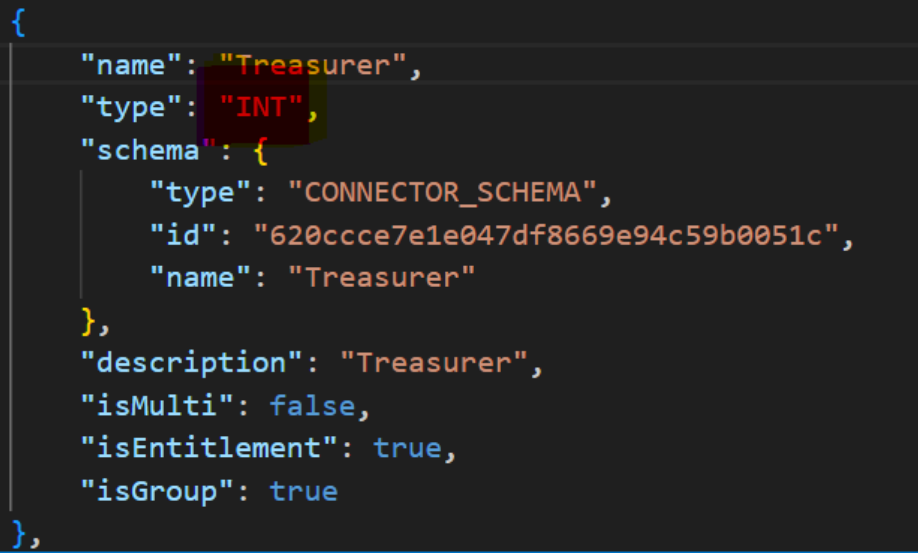

Step 3: Update HTTP Operation Body Format

After changing the data type:

  • Ensure the value is not wrapped in quotes in your HTTP body.
  • Correct format:
"AttributeNameOnTarget": $plan.attributeNameOnIDNAccount$

:red_exclamation_mark: Don’t use double quotes around integer values; it will break the integration for INT fields.

Example:


Outcome

Once configured:

  • The entitlements corresponding to attribute values are created and available in IdentityNow.
  • Access Profiles can assign the correct entitlement based on job role/title.
  • Provisioning will deliver the correct attribute value automatically via the entitlement mechanism.

This method is clean, reusable, and ideal for managing dynamic attribute-based provisioning across multiple users and roles.

1 Like

You may want to consider writing this up in a blog.

SailPoint Developer Community

Thanks @ts_fpatterson , I have posted it as Blog Draft

1 Like

But i can’t see the status of this blog draft

Thanks for the detailed breakdown, Harsh! This is a fantastic walkthrough of how to leverage entitlements as attribute carriers in ISC.

I particularly appreciate how you addressed the data type mismatch issue (string vs. int) during entitlement creation and schema correction via VS Code extension: SailPoint Identity Security Cloud. That detail often goes unnoticed and causes silent failures in downstream systems.

Your note on removing quotes for integer values in the HTTP body is a crucial callout.

It might be useful to mention how this model scales well for entitlement that can be multi-valued.

All in all, this is a clean, scalable solution.

Thanks @TheOneAMSheriff !

1 Like

Hello @hkhandale,

This draft is definitely an insightful post, good to hear you have shared within the blog-draft section, that way you can get points.

FYI usually it can take around 3-5 days to get your post approved after has been shared in the blog-draft section

it’s been quite a while since I submitted the post (before June 12), and I haven’t received any update yet.

Appreciate your efforts and thinking to do out side the box. Here is what I think

You cannot assign entitlements automatically using Access Profiles, you have to build RBAC.

If it is profile attributes like Department, Job Title …etc, you can calculate them using Transforms, better use Identity attributes as you need attribute sync for them.

The only challenge is to add some attributes based on access requested or even if access is automated through Roles. Then you need Rules, if the connector has connector Rules then it is simple, if not we need to depend on Before Provisioning Rule (Cloud) which needs SailPoint Expert Services to deploy it. If you wanna avoid Rules then maybe you can go for making those attributes into entitlements, otherwise not required.

If connector Rules available then I would not go for marking them as entitlements, this will increase Aggregation durations, extra Access objects.

Thanks for the detailed response Krishna.

I did consider using a rule, but the challenge is maintainability. If we define a rule with logic like “for this title, assign this value,” we would have to account for all possible titles. In the future, if new titles are introduced or existing ones are modified, the rule would need to be updated. This would require SailPoint development expertise every time, which the client wants to avoid.

That’s why I proposed using Access Profiles in this way — it offers more flexibility to the client. They can easily manage and update the mappings themselves without needing to involve a developer, and it’s easier for them to understand and maintain over time.