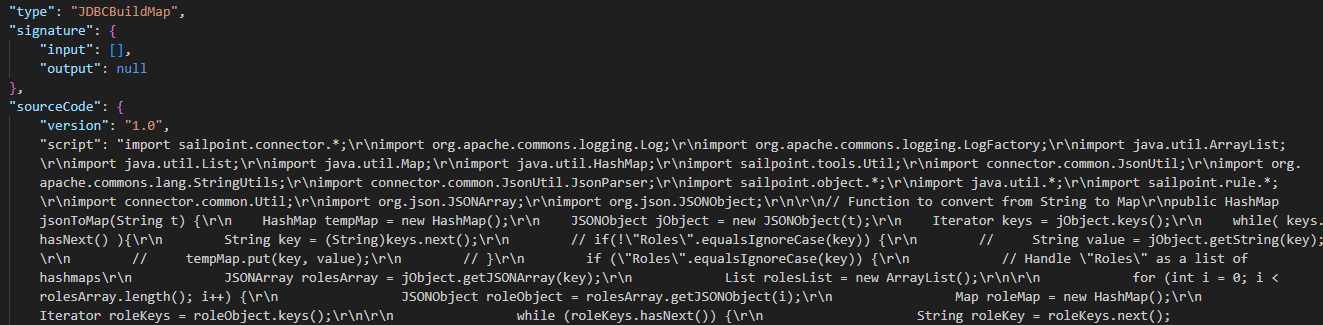
We’re having to make a change to one of our cloud rules, I’ve gone to download the script however the formatting is quite ugly.
Is there a way we are able to download this script from ISC in a way that doesn’t require manual formatting - how it is being exported is difficult to interpret:
Try using the Visual Studio Code extension “SailPoint Identity Security Cloud“. Install and export the objects of your tenant here and view all the rules.
I don’t think there is a ready solution available for this. However, I developed an application using NodeJS and Electron that reads the cloud rules using SP-Config API and displays the code formatted as shown below:
I will recommend you to install the Command Line Interface(CLI) tool to download all the rules from the ISC tenant with a proper rule format as per below documentation which has information about installation, configuration & usage.
Note: I’m currently using the CLI tool to download the rules from the ISC tenant with a proper rule formatting.
Hi @markomanium - this is EXACTLY what I am after; however, not sure about how safe it is to use being a public website… Do you know if there is a way SailPoint offer formatting for the code stored in their own DB?
@dineshdupati , I have tried your method but sadly the formatting persists:
In VS Code, if you right click on the rule and select “Edit script”, it will display as the format you are looking for. You can even edit and save without having to convert back to JSON.