WriteBack in SQLLoader Connector is not working

:bangbang: Please be sure you’ve read the docs and API specs before asking for help. Also, please be sure you’ve searched the forum for your answer before you create a new topic.

Please consider addressing the following when creating your topic:

  • What have you tried?

We are trying to perform writeback into the CSV file located at an SFTP location using SQL Loader Connector. In order to perform writeback, we have created “JDBC Provisioning Connector Rule” and attached it to the source.

Also, we have added an attribute in “Create Account“ profile of source, mapped to an identity attribute named as “PrimaryEmail“ and then, have enabled attribute sync so that JDBC provisioning rule is triggered which will perform actual updates in target CSV file.

Note that I am able to access/read/write the CSV file using WINSCP.

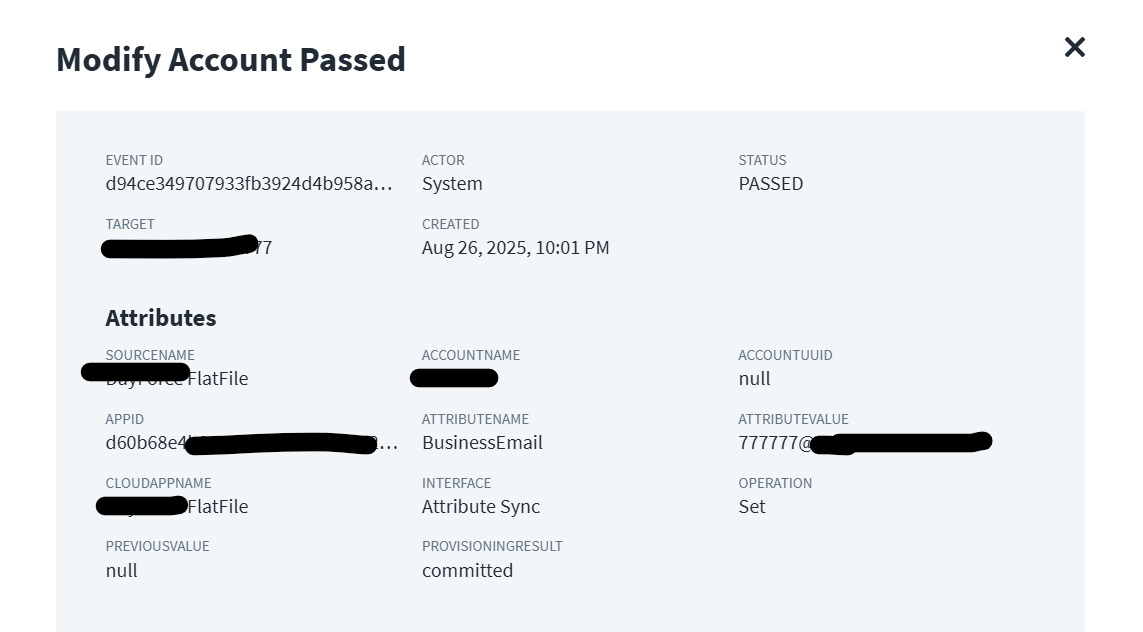
The modify event is getting triggered and there is not exception in the event, the code seems to be working as expected.

But, when I check the Target - CSV file in the respective SFTP location, the BusinessEmail attribute is still blank and is not updated.
  • What errors did you face (share screenshots)?

The modify Account event screenshot is as follows.

  • Share the details of your efforts (code / search query, workflow json etc.)?

The JDBC provisioning rule which is connector rule is also attached to SOURCE successfully.

The code details are as follows.

import java.sql.Connection;
  import java.sql.DriverManager;
  import java.sql.PreparedStatement;
  import java.sql.SQLException;
  import java.sql.Types;
  import java.util.List;
  import sailpoint.api.SailPointContext;
  import sailpoint.connector.JDBCConnector;
  import sailpoint.object.Application;
  import sailpoint.object.ProvisioningPlan;
  import sailpoint.object.ProvisioningPlan.AccountRequest;
  import sailpoint.object.ProvisioningPlan.AttributeRequest;
  import sailpoint.object.ProvisioningPlan.PermissionRequest;
  import sailpoint.object.ProvisioningResult;
  import sailpoint.object.Schema;
  import sailpoint.object.Identity;
  import sailpoint.object.*;

  public String getAttributeRequestValue(AccountRequest acctReq, String attribute) {

    if ( acctReq != null ) {
      AttributeRequest attrReq = acctReq.getAttributeRequest(attribute);
      if ( attrReq != null ) {
        return attrReq.getValue();
      }
    }
    return null;
  }
   
  ProvisioningResult result = new ProvisioningResult();
  PreparedStatement statement = null;
  String businessEmail = null;

  if ( plan != null ) {

    List accounts = plan.getAccountRequests();
    if ( ( accounts != null ) && ( accounts.size() > 0 ) ) {
      for ( AccountRequest account : accounts ) {
        try {
           if ( AccountRequest.Operation.Modify.equals( account.getOperation() ) ) {

			businessEmail = getAttributeRequestValue(account,"BusinessEmail");
			
			if ( businessEmail != null && !"no-reply@test.com".equalsIgnoreCase(businessEmail) ) {
			String nativeIdentity = null;
			nativeIdentity = (String) account.getNativeIdentity();
			statement = connection.prepareStatement( "update Sailpoint set BusinessEmail = ? where EmployeeReferenceCode = ?" );
            statement.setString ( 1, (String) businessEmail );
            statement.setString ( 2, (String) nativeIdentity );
        
            statement.executeUpdate();

            result.setStatus( ProvisioningResult.STATUS_COMMITTED );
			}
          }
        }
        catch( SQLException e ) {
          result.setStatus( ProvisioningResult.STATUS_FAILED );
          result.addError( e );
        }
        finally {
          if(statement != null) {
            statement.close();
          }
        }
      }
    }
  }
  return result;


  • What is the result you are getting and what were you expecting?

No errors/exceptions are getting thrown but BusinessEmail attribute is not getting updated.

Do we have to connect with Sailpoint to enable any FEATURES for SQLLoader Connector/Source which is using this SQL Loader Connector?

Hi @rohit_wekhande

I can see that the provisioning event screenshot shows PROVISIONINGRESULT: committed, which might indicate your provisioning rule is executing successfully. The rule returns “committed” status regardless of whether rows were actually updated from my understanding. If possible add verification/logs to check if the UPDATE actually affected any rows:

// Add logging to verify the values

log.info("Processing update for nativeIdentity: " + nativeIdentity);
log.info("BusinessEmail value: " + businessEmail);
statement = connection.prepareStatement("UPDATE Sailpoint SET BusinessEmail = ? WHERE EmployeeReferenceCode = ?");
statement.setString(1, (String) businessEmail);
statement.setString(2, (String) nativeIdentity);            
int rowsUpdated = statement.executeUpdate();
log.info("Rows updated: " + rowsUpdated);

You might be already aware SQL Loader has a known limitation where the value of columns used in WHERE clauses should not exceed 19 characters. Verify: EmployeeReferenceCode values are within this range, from the screenshot, value does seem a bit long. Please check column names used in rule (BusinessEmail, EmployeeReferenceCode) exactly match your CSV headers.

Alternatively, you may try a controlled test to isolate the issue:

// Test with a known existing record and simple value
statement = connection.prepareStatement("UPDATE Sailpoint SET BusinessEmail = 'test@domain.com' WHERE EmployeeReferenceCode = ?");
statement.setString(1, "12345"); // an ID you know exists

Good luck

Hello,

The EmployeeReferenceCode is like employee number which is not greater than 10 characters for any users, so I think we are good in there. The BusinessEmail though can be greater than 19 characters but we are not using that in WHERE clause.

We have raised a support ticket with SailPoint.

Regards,

Rohit Wekhande.

Hello All,

The issue was with file located at SFTP server as it use to take couple of seconds to load the file with updates.

The code as mentioned below is working as expected. While testing you need to make sure that you are refreshing the file on SFTP server before opening it or copying the file using WinSCP into your local machine before validating the changes.

import java.sql.Connection;
  import java.sql.DriverManager;
  import java.sql.PreparedStatement;
  import java.sql.SQLException;
  import java.sql.Types;
  import java.util.List;
  import sailpoint.api.SailPointContext;
  import sailpoint.connector.JDBCConnector;
  import sailpoint.object.Application;
  import sailpoint.object.ProvisioningPlan;
  import sailpoint.object.ProvisioningPlan.AccountRequest;
  import sailpoint.object.ProvisioningPlan.AttributeRequest;
  import sailpoint.object.ProvisioningPlan.PermissionRequest;
  import sailpoint.object.ProvisioningResult;
  import sailpoint.object.Schema;
  import sailpoint.object.Identity;
  import sailpoint.object.*;

  public String getAttributeRequestValue(AccountRequest acctReq, String attribute) {

    if ( acctReq != null ) {
      AttributeRequest attrReq = acctReq.getAttributeRequest(attribute);
      if ( attrReq != null ) {
        return attrReq.getValue();
      }
    }
    return null;
  }
   
  ProvisioningResult result = new ProvisioningResult();
  PreparedStatement statement = null;
  String businessEmail = null;

  if ( plan != null ) {

    List accounts = plan.getAccountRequests();
    if ( ( accounts != null ) && ( accounts.size() > 0 ) ) {
      for ( AccountRequest account : accounts ) {
        try {
           if ( AccountRequest.Operation.Modify.equals( account.getOperation() ) ) {

			businessEmail = getAttributeRequestValue(account,"BusinessEmail");
			
			if ( businessEmail != null && !"no-reply@test.com".equalsIgnoreCase(businessEmail) ) {
			String nativeIdentity = null;
			nativeIdentity = (String) account.getNativeIdentity();
			statement = connection.prepareStatement( "update Sailpoint set BusinessEmail = ? where EmployeeReferenceCode = ?" );
            statement.setString ( 1, (String) businessEmail );
            statement.setString ( 2, (String) nativeIdentity );
        
            statement.executeUpdate();

            result.setStatus( ProvisioningResult.STATUS_COMMITTED );
			}
          }
        }
        catch( SQLException e ) {
          result.setStatus( ProvisioningResult.STATUS_FAILED );
          result.addError( e );
        }
        finally {
          if(statement != null) {
            statement.close();
          }
        }
      }
    }
  }
  return result;

This topic was automatically closed 60 days after the last reply. New replies are no longer allowed.