Hello. I am running into issues with a very simple workflow which attempts to add users to a role. The error is below. It appears to be some sort of a payload malform. I do not know what I am doing wrong within the Manage Access action.
Does anyone have any suggestions regarding how to structure this correctly?
    "errorMessage": "task failed: activity error (type: sp:access:manage, scheduledEventID: 5, startedEventID: 6, identity: 1@sp-workflow-worker-stg-us-east-1-5c6c6b7bff-45tv2@sp-workflow-engine): request failed (type: Bad Request, retryable: false): 400 - 400 Bad Request:  (type: HTTP Response Returned a Client Error, retryable: false): request failed (type: Bad Request, retryable: false): 400 - 400 Bad Request (type: fundamental, retryable: true)",
    "payload": null
  },
My workflow does the following;
Scheduled event trigger (Successful)
Get a list of identities based on a saved search (Successful)
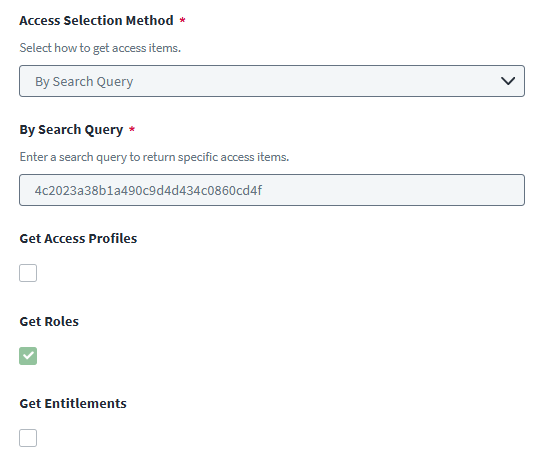
Get Access for the role in question (Successful)
Manage Access within a loop to add users (Failure)
Manage Access selects identities using “$.loop.loopInput“
The Access To Manage uses the variable selector “$.getAccess.accessItems“
The role is enabled, requestable, and Manage Access notes no duration at this time.
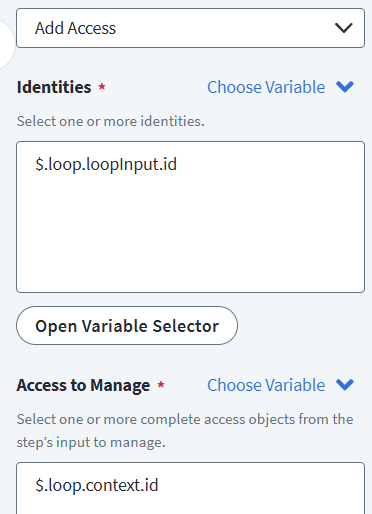
Hey usually $.loop.loopInput would have all the identities that you have got in your “Get List of Identities” You have to also pass something like this $.loop.loopInput.id to add the access to each identity.
Also you are doing Get Access outside the Loop and you are not passing inside the loop so the visibility of that may not be available. You can validate it by adding a simple Send Email step as the first step in your loop
@RPook Alternative potential solution: if the list of identities you pull can be grouped/encapsulated by some criteria, for example, lifecycle state or some other attribute value common for these identities, maybe you should consider creating a birthright role instead of a workflow?
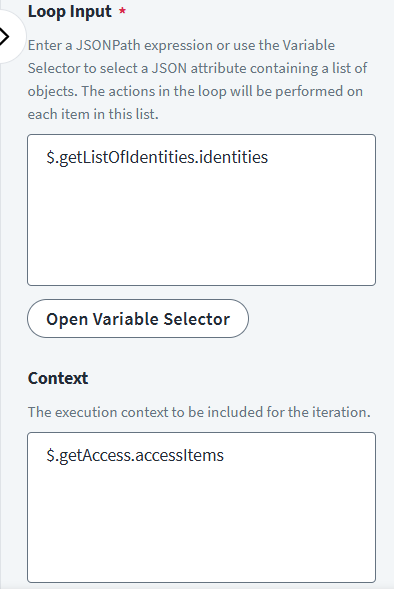
@udayputta Thanks for the feedback! The Loop Input is currently .getListOfIdentities.identities with nothing in the Context.
It seems to be passing the correct number of Identities from the getListOfIdentities action. The number of 400 errors aligns with the total number of users found in the Saved Search result referenced in that action.
The manageAccess step has been tested using $.loop.loopInput.id within the Identities and $.getAccess.accessItems in the Access To Manage passed by the Choose Variable function. Is it necessary to put it within the loop? That seems inefficient. Does SailPoint recognize the passed variable?
@markomanium This started as a birthright group. We pre-provision accounts in a future state. Our source cannot apply the role until the START_DATE. Unfortunately, these identities are not being evaluated until the unoptimized identity refresh at 8pm local time. The end result is that they do not have access on their first day.
Your “Get Access” step is outside the loop and you cannot use $.getAccess.accessItems directly. You have to pass it to the loop and then refer in your manage access step like below
Now in your “Manage Access to group” step you can refer the context like $.loop.context.id to assign access to each of the identity. This should work for you.
However, I receive some sort of a json related issue with each iteration of the loop
"errorMessage": "task failed: activity error (type: sp:access:manage, scheduledEventID: 5, startedEventID: 6, identity: 1@sp-workflow-worker-stg-us-east-1-5c75d9bdfd-lg9rr@sp-workflow-engine): json: cannot unmarshal string into Go struct field ManageAccessInput.requestedItems of type []infra.OutputAccessItem (type: Error Parsing Input, retryable: false): json: cannot unmarshal string into Go struct field ManageAccessInput.requestedItems of type []infra.OutputAccessItem (type: UnmarshalTypeError, retryable: true)", "payload": null
My Bad the Manage Access action is expecting id, name & type so you should not be using $.loop.context.id you can just pass as $.loop.context. I have tested it and it is working for me.
From my research, it appears that the unmarsheling error occurs when a single item is reverenced via JSONpath. My GetAccess action does only return a single Role. I’m not sure if that is causing issues or not.
I’m still not having any luck. I have browsed the forums, but I see references to the “unmarsheling” error. According to support, troubleshooting requires expert services. I’m not certain if that is part of the issue or not.
My workflow has always gotten a list of identities based on a search query. Should it be performing Get Accounts, then passing that into the loop?
My suggestion would be to create a new workflow from scratch in the UI and replecate what you have in the old workflow one by one and see it that works. To me it does not seems to be a problem and it is working when I have tested it.
Thus far my team and I have been unable to successfully add identities to roles via workflows. In a perfect world we could reverse engineer a working template or example, but no success at this point.