Using SailPoint Provisioning Rules to Transform AD DN to Google OrgUnitPath

Hi everyone,

We’re migrating from GCDS (Google Cloud Directory Sync) to Entra ID Google Cloud connector and need help with a specific transformation challenge.

Current Challenge:

  • We need to convert AD Distinguished Names to Google OrgUnitPath format

  • Example transformation needed:

    • From: CN=Test User,OU=subsubOU,OU=subOU,OU=OU,DC=domain,DC=net

    • To: /OU/subOU/subsubOU

  • [UPDATE] In some cases, we’ll have to map some OUs with different ones on Google. For example:

    • ldap dn : CN=Test User,OU=subsubOU,OU=subOU,OU=OU,DC=domain,DC=net
    • target orgUnitPath on Google : /externals

The Problem: Entra ID’s expression builder can’t reverse the OU order (it can generate subsubOU/subOU/OU but not /OU/subOU/subsubOU).

Proposed Solution: Use SailPoint IdentityNow “after provisioning” rules to:

  1. Capture the user’s AD account DN after account creation

  2. Apply transformation logic to convert DN → Google OrgUnitPath format

  3. Store result in a custom identity attribute

  4. Sync this attribute to Entra ID → Google (no further transformation needed)

Questions:

  1. What’s the best approach to implement this DN-to-OrgUnitPath transformation in a provisioning rule?

  2. Are there any built-in SailPoint functions that can help parse and reverse OU hierarchies?

  3. Should we use BeforeProvisioning or AfterProvisioning rules for this use case?

  4. Any gotchas or best practices for storing custom attributes that will be synced downstream?

Thanks for your help!

Try mapping the canonicalName ldap attribute ( Canonical-Name attribute - Win32 apps | Microsoft Learn ). If that works, then strip the domain name and cn from it.

1 Like

Hey @j_place ,

Thank you, I didn’t know about this ldap attribute.

However, I think I still need an after provisioning rule as for some use cases, I need to change the target OU on Google.

For example:

  • ldap dn : CN=Test User,OU=subsubOU,OU=subOU,OU=OU,DC=domain,DC=net
  • target orgUnitPath on Google : /externals

Thanks for the new requirement :wink:

Hopefully you haven’t got many of those, so you could maybe wrap in a replaceAll transform (Replace All | SailPoint Developer Community)

1 Like

Interesting, will give it a try and let you know.
Btw, I was so sure I would need an after provisioning rule that I didn’t mention the 2nd requirement :grinning_face_with_smiling_eyes: my bad, I’ll update my post.
Thanks again for the reply.

To make it more manageable, i would recommend stripping the Domain and CN on the way in (Identity Profile) and then the replace all on the way out (Account attribute mapping).

1 Like

@j_place , your solution worked for me. Thanks again!

However, I have another requirement that I couldn’t predict. I’ve been told that, for some use cases, GCDS is configured to target specific users with a custom LDAP query to place them into specific Google organizational units (OU). For example,

Source LDAP query: (&(objectCategory=person)(objectClass=user)(mail=*)(co=Germany)(StartDate>=2023-03)(!userAccountControl:1.2.840.113556.1.4.803:2))

Unfortunately, the “ReplaceAll” transform rule won’t work because it’s based on a single attribute, “canonicalName.”

Once again, I’m afraid I’ll have to use an after-provisioning rule :confused:

I would appreciate help with that :folded_hands:

You’re really fixed on that after provisioning rule :wink: I would strongly recommend not using a rule as you will be hard coding and deploying config which (I assume) could change.

Is AD your auth source or are you provisioning into AD?

@j_place , our Auth source is Workday, SailPoint will create accounts on AD, which will then be synced to :

  • Entra ID : through Entra ID Connect Sync
  • Google : through GCDS

Today, we’re using GCDS only for users’ sync, groups are synced through Entra ID Google Cloud Connector, and we want to get rid of GCDS and move to a cloud based solution.

GCDS has a rich set of features and I’m trying to figure out how to replace them. Unfortunately, I’m indeed fixed on the after (or before) provisioning rule because of GCDS ability to place users onto Google specific OUs following an LDAP query based on multiple LDAP attributes. For this one, no “easy” workaround for me, I need to hard code.

PS: You can find below an overview of our identity management flow

[Update]

I’m not really eager to use before/after provisioning rules, I don’t like them tbh.
I might consider using an automation on Azure to catch newly created accounts on Entra ID and update their corresponding orgUnitPath custom directory attribute.
In that case, the transform you shared with me will help clean the canonicalName and send it to Entra ID to be easily processed.

You need to think about it in a different way. If you are provisioning into AD, then the IGA is mastering that information; if that information is used downstream (GCDS, in this case), the information is still mastered at the IGA.

What I mean is, you currently have logic in ISC to generate the AD DN, so ISC logic should also be used to generate the Google Workspace OUs, ie don’t base the Google OUs on the AD account, base them on the Identity. The canonicalName solution above was an answer to a specific question.

The LDAP query above is a method for GCDS to “pull” information from AD, you want to convert that into a “push” from IGA with the same logic. All that LDAP query does (I guess) is return Enabled German Users with a start date later than Mar 23. That is exactly the sort of logic that ISC can handle with identity attributes and transforms.

That makes sense :slight_smile:

I understand that by

“convert that into a “push” from IGA with the same logic”

you refer to the fact that SailPoint should handle the logic to place users into Google OUs, through a “Google Cloud” connector. Please correct me if I’m wrong.

Yeah, I had been thinking you were intending to use the ISC Google Cloud connector.

However, I’ve re-read your posts and I’m actually going to change my position, looking at your infrastructure and the fact that you want to use Entra Provisioning to connect to Google Cloud.

Because you are using Entra Connect, I wouldnt do this with ISC.

I think you would be best to add canonicalName to your Entra Connect mapping configuration. Then do the additional logic in your Entra Provisioning app. Such as:

Scope: Only Enabled Users with email present

OrgUnitPath: Use Expression builder to add your logic using commands such as IIF (If and only if), DateDiff (date comparison) CDate (convert to date format) to provide the logic such as “If [country] is Germany and [StatusHireDate] is greater than March 23 then “OrgUnitPath1’ else {next case}, else {additional cases} else [entra attribute holding canonicalName] (the default value)

Thanks for the insights.

It would have been easy if there were only one rule, but there are more—maybe 15 of them. It will be impossible to fit them all into one expression :frowning:

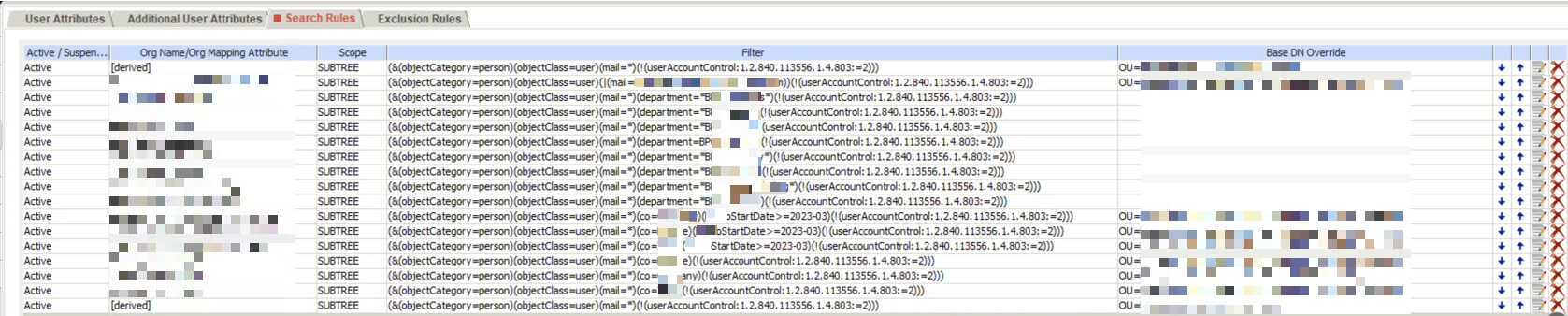
GCDS config looks like this

That should be easily do-able with one expression, bear in mind you can nest functions.

Ignore the objectCategory, objectClass, mail wildcard and userAccountControl fields, you can control those with scope, ie only sync enabled users with an email address.

You can’t do an OR, so your first expression is to match those 2 email addresses:

IIF([mail]=”value1”,”OrgPath1”,IIF([mail]=”value2”,”OrgPath1”,next expression))

Your next expression will Switch on the 8 department names:

SWITCH([department],next expression,”department1”,”OrgPath2”,”department2”,”OrgPath3”,…etc,)

Your next expression will then do the country stuff, and looks like:

SWITCH([country],[attribute holding canonicalName],”country1”,IIF(DateDiff(etc.),”OrgPath8”,”OrgPath9”),”country2”,IIF(DateDiff(etc.),”OrgPath10”,”OrgPath11”),”country3”,IIF(DateDiff(etc.),”OrgPath12”,”OrgPath13”)))

I haven’t included the DateDiff syntax coz it’s a bit involved and you want to do some of the work, right?

So you can get it down to about 3 expressions with multiple rules. You wouldn’t be able to use Expression Builder to do this, you would need to type it freeform, so a lot of testing/iteration. You could do the separate rules in expression builder to test the building blocks.

Content provided as-is and is not tested :wink:

1 Like

@j_place , I didn’t know much about the limits of the Expression Builder, which is why I didn’t consider it a viable solution.

Thanks for the details and step-by-step example. Indeed, I’m willing to do some of the work :grinning_face_with_smiling_eyes:

I’ll test the Expression Builder and let you know ASAP.

Thanks again! :folded_hands:

This topic was automatically closed 60 days after the last reply. New replies are no longer allowed.