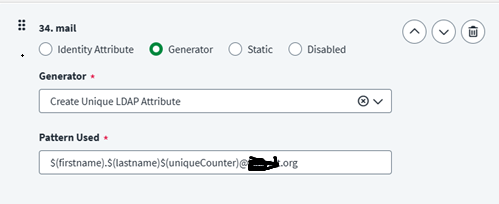
We are attempting to generate email addresses using the Active Directory connector via Create Account. However, we’ve observed that the “uniqueCounter” is not functioning as expected when multiple users share the same first and last names.
As far as I understand it, uniqueCounter can only be the last variable being used in the template. Here is a post talking about this issue. Can you try removing $(domainname) from your template and just hardcoding a domain name for now to see if this works?
Hi @Ankit_002 Can you clarify the screengrab which you have included with a list of “Users”. You appear to be showing a list of Identities - how are you populating the email field of the identities?
Hi @zachm117 With respect, think you could be mis-interpreting the posts. If you are using username generator transform with multiple patterns, the pattern which includes the uniquecounter should be the last pattern in the list (makes sense if you think about it). I don’t believe there is any constraint on where uniquecounter is placed within the pattern.
I agree that I could be mistaken, hence why I said “as far as I understand it” instead of “this is how it works”. I remembered running into something regarding this a few years ago. Things could have changed, I could have fixed a different issue inadvertently, or I could be mis-remembering. Given that and some of the mixed information in other posts, I figured it was worth checking if simply removing the $(domainname) reference would fix the issue or not, as I didn’t have this setup in a tenant to confirm one way or another myself and this seemed like the simplest way to test if that was the issue here or not since there wasn’t a clear answer.
Additionally, @Ankit_002 how are you running this test? I see that all of your test users have the same name. Your usernames in the screenshot are going from 10-15. 10, 11, and 12 all have 5 in the email, while 13, 14, and 15 all have 6 in the email. So it looks like it is doing some kind of incrementation, but you may be running into a race condition if you are trying to create all of these accounts with the same name/email at the same time. If this is the case, can you try creating one account at a time (with or without the $(domainname)) to see if the incrementation is working as expected?
Hi @zachm117 ,we validate it and found that when I creating users one at a time, the unique counter works as expected. However, when pushing 2–3 users simultaneously, the results are not accurate. In a real-world scenario, we can expect such bulk operations, and I am concerned that this solution may not be viable.
Can you try your bulk operations again but use different names for your test accounts? The problem you were experiencing is that multiple accounts with the same name/email were being created at the same time in your testing. In a real world scenario, you typically wouldn’t expect to be hiring many users at the same time with the same name. If you are hiring multiple users at the same time with the same name (and they are getting the same non-incremented email value), this is when you can encounter a race condition due to the multithreaded processing. If 2 John Smiths are being processed at the exact same time, ISC may not see both emails that are being generated/used since the operations are happening simultaneously, which can lead to them both getting the same uniqueCounter when ISC is creating the provisioning plan for each account create operation.
If you are concerned about this possible race condition occurring, meaning you expect to onboard multiple users at the same time with the same name, you might want to look into adding a BeforeCreate rule to your AD source to check uniqueness against your Exchange server. This post details this process pretty well if it is something you would like to look into implementing to account for users with the same name being onboarded (having an account created for them) at the same time.