Hi @shijingg ,
You can use the HttpSession to store and pass dynamic values between your Quicklink and Workflow steps, which can then be displayed on the UI after form submission.
Add a httpSession entry in the Quicklink configuration, then include a confirmation step in your workflow. Retrieve the API response from the Execute Rule step and pass it to the confirmation step for display.
i have updated the workflow and quicklink. Try with this.
Self Service View Workflow.xml (3.0 KB)
Account Invite_quicklink.xml (1.0 KB)
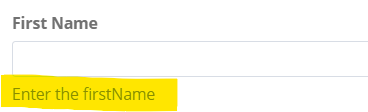
Can I add some helper text for the quicklink form? Like a (?) at each field?
You can use helpKey in the form field. Helper text populate on the form field.
<Field displayName="First Name" name="firstname" helpKey="Enter the firstName" type="string"/>