Which IIQ version are you inquiring about?
8.4
Share all details about your problem, including any error messages you may have received.
Hello all!
I currently configured a quicklink, workflow with form and a rule.
This quicklink is for users to submit a form and an API is called. All is working but I would like to further enhance the UX as it is not very intuitive for users after the form is submitted. Below are my questions:
- Is there any way I can display a dynamic message on the UI post form submission depending on the API response?
- If yes, where should this be configured? On the workflow or rule?
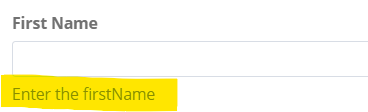
- Can I add some helper text for the quicklink form? Like a (?) at each field?
Something similar to the message post submission of access request would be good. (Below image)

Sharing all my working code!
<?xml version='1.0' encoding='UTF-8'?>
<!DOCTYPE QuickLink PUBLIC "sailpoint.dtd" "sailpoint.dtd">
<QuickLink action="workflow" category="Self Service" messageKey="Account Invite" name=QuickLink">
  <Attributes>
    <Map>
      <entry key="workflowName" value="Self Service View Workflow"/>
    </Map>
  </Attributes>
  <Description>Self Service Account Invite</Description>
  <QuickLinkOptions allowSelf="true">
    <DynamicScopeRef>
      <Reference class="sailpoint.object.DynamicScope" name="Self Service"/>
    </DynamicScopeRef>
  </QuickLinkOptions>
</QuickLink>
<?xml version='1.0' encoding='UTF-8'?>
<!DOCTYPE Workflow PUBLIC "sailpoint.dtd" "sailpoint.dtd">
<Workflow explicitTransitions="true" name="Self Service View Workflow">
  <!-- Define all required variables -->
  <Variable input="true" name="launcher"/>
  <Variable name="email"/>
  <Variable name="firstName"/>
  <Variable name="lastName"/>
  <Variable name="mobileNumber"/>
  <Variable name="username"/>
  <Variable name="ruleResult"/>
  <Variable initializer="true" name="trace"/>

  <Step icon="Start" name="Start" posX="36" posY="82">
  <Transition to="Display Form"/>
</Step>
<Step icon="Stop" name="Stop" posX="342" posY="76"/>
<Step icon="Default" name="Display Form" posX="128" posY="84">
  <Approval name="Sample Form" owner="script:return context.getUserName();" return="firstname,lastname,email,mobile,username" send="">
    <Form name="Account Guest Invite">
      <Attributes>
        <Map>
          <entry key="pageTitle" value="Account Guest Invite"/>
        </Map>
      </Attributes>
      <Section name="User Details ">
        <Field displayName="First Name" name="firstname" type="string"/>
        <Field displayName="Last Name" name="lastname" type="string"/>
		<Field displayName="Email" name="email" type="string"/>
		<Field displayName="Mobile Number" name="mobile" type="string"/>
		<Field displayName="Username" name="username" type="string"/>
      </Section>
      <Button action="next" label="Submit"/>
      <Button action="back" label="Back"/>
    </Form>
  </Approval>
  <Transition to="Execute Rule">
    <Script>
      <Source> boolean result =false; if(lastApprovalState.equalsIgnoreCase("Finished")){ result = true; } return result</Source>
    </Script>
  </Transition>
  <Transition to="Stop"/>
</Step>
<Step action="rule:Guest Account Invite" icon="Default" name="Execute Rule" posX="255" posY="140">
  <Transition to="Stop"/>
</Step>
</Workflow>
<?xml version='1.0' encoding='UTF-8'?>
<!DOCTYPE Rule PUBLIC "sailpoint.dtd" "sailpoint.dtd">
<Rule language="beanshell" name="Guest Account Invite" type="Workflow">
  <Description>A rule used by a Workflow to determine a step action or variable value. Note that an Attributes map of all variables from the current WorkflowContext, merged with the arguments from the Step, is also passed into the workflow rule.</Description>
  <Signature returnType="Object">
    <Inputs>
      <Argument name="log" type="org.apache.commons.logging.Log">
        <Description> The log object associated with the SailPointContext. </Description>
      </Argument>
      <Argument name="context" type="sailpoint.api.SailPointContext">
        <Description> A sailpoint.api.SailPointContext object that can be used to query the database if necessary. </Description>
      </Argument>
      <Argument name="wfcontext">
        <Description> The current WorkflowContext. </Description>
      </Argument>
      <Argument name="handler">
        <Description> The workflow handler associated with the current WorkflowContext. </Description>
      </Argument>
      <Argument name="workflow">
        <Description> The current Workflow definition. </Description>
      </Argument>
      <Argument name="step">
        <Description> The current Step. </Description>
      </Argument>
      <Argument name="approval">
        <Description> The current Approval. </Description>
      </Argument>
      <Argument name="item">
        <Description> The WorkItem being processed. </Description>
      </Argument>
    </Inputs>
    <Returns>
      <Argument name="Object">
        <Description> The result of the workflow rule; dependent on the rule itself. </Description>
      </Argument>
    </Returns>
  </Signature>
<Source>import org.apache.log4j.Logger;
  import org.apache.log4j.Level;
  import sailpoint.object.Field;
  import sailpoint.object.Form;
  import sailpoint.object.Form.Section;
  import sailpoint.object.FormItem;
  import java.util.ArrayList;
  import java.util.List;
  import java.util.Base64;
  import org.apache.http.client.HttpClient;
  import org.apache.http.impl.client.HttpClients;
  import org.apache.http.client.methods.HttpPost;
  import org.apache.http.client.entity.UrlEncodedFormEntity;
  import org.apache.http.message.BasicNameValuePair;
  import org.apache.http.HttpResponse;
  import org.apache.http.util.EntityUtils;
  import org.apache.http.entity.StringEntity;
  import org.json.JSONObject;
  import sailpoint.tools.Util;
  import java.util.HashMap;
  import java.util.Map;

  Logger log = Logger.getLogger("sailpoint.services.rule.buttonrule");

  // Initialize variables to store form values
  String finalAccessToken = null;
  HttpClient httpClient = null;
  String response = null;

  try {

    log.error("Before token");
    // Get token
    /*Code to get token*/

    log.error("Executing token request");
    HttpResponse tokenResponse = httpClient.execute(tokenPost);
    int statusCode = tokenResponse.getStatusLine().getStatusCode();

    if (statusCode == 200) {
      String responseBody = EntityUtils.toString(tokenResponse.getEntity());
      log.error("Token response received");
      JSONObject jsonResponse = new JSONObject(responseBody);
      String accessToken = jsonResponse.getString("access_token");
      finalAccessToken = "Bearer " + accessToken;

      // Create vendor request
      log.error("Preparing vendor request");
      JSONObject jsonBody = new JSONObject();
      jsonBody.put("email", email);
      jsonBody.put("firstName", firstname);
      jsonBody.put("lastName", lastname);
      jsonBody.put("mobileNumber", mobile);
      jsonBody.put("username", username);

      log.error("Request payload: " + jsonBody.toString());

      // Execute POST request
      String vendorUrl = "*****";
      HttpPost vendorPost = new HttpPost(vendorUrl);
      StringEntity entity = new StringEntity(jsonBody.toString());
      vendorPost.setEntity(entity);

      // Add headers
      vendorPost.setHeader("Content-Type", "application/json");
      vendorPost.setHeader("Authorization", finalAccessToken);
      vendorPost.setHeader("x-api-key", finalAPIKey);
      vendorPost.setHeader("Accept", "application/json");

      // Execute request
      HttpResponse vendorResponse = httpClient.execute(vendorPost);
      response = EntityUtils.toString(vendorResponse.getEntity());

      log.error("Vendor API Response: " + response);
      return response;

    } else {
      log.error("Token request failed with status code: " + statusCode);
      throw new Exception("Failed to acquire token");
    }

  } catch (Exception e) {
    log.error("Error in rule execution: " + e.getMessage(), e);
    throw e;
  } finally {
    if (httpClient != null) {
      try {
        httpClient.close();
      } catch (Exception e) {
        log.error("Error closing HttpClient: " + e.getMessage());
      }
    }
  }</Source>
</Rule>
Any help would be appreciated