Trigger Workflow on Any Workflow Failure in Tenant

Hi folks,

I’m currently working on a requirement where I need to trigger a workflow automatically if any other workflow fails in the tenant.

So far, I’ve attempted to build this using a scheduled trigger that scans workflow executions, but I haven’t been able to achieve the desired result of detecting failures across all workflows reliably.

If anyone has come across a similar use case or has suggestions/workarounds on how to monitor and react to any workflow failure within the tenant, I’d really appreciate your insights.
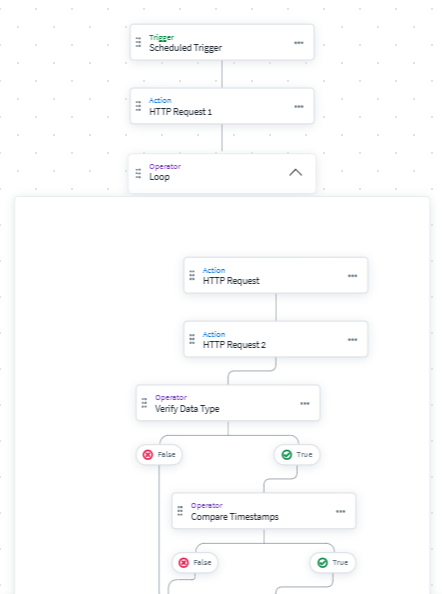

	"name": "workflow failure notification 2",
	"description": "",
	"modified": "2025-06-13T03:52:22.184936954Z",
	"modifiedBy": {
		"type": "IDENTITY",
		"id": "",
		"name": ""
	},
	"definition": {
		"start": "HTTP Request 1",
		"steps": {
			"End Step - Success": {
				"actionId": "sp:operator-success",
				"displayName": "",
				"type": "success"
			},
			"HTTP Request 1": {
				"actionId": "sp:http",
				"attributes": {
					"authenticationType": "OAuth",
					"headerAuthName": "Authorization",
					"method": "get",
					"oAuthClientId": "9aa9faa9d9eb4eb08d9f783497462896",
					"oAuthClientSecret": "$.secrets.b811f4a2-3960-47e2-ab2f-b1d1e90fadea",
					"oAuthCredentialLocation": "oAuthInHeader",
					"oAuthScope": "",
					"oAuthTokenUrl": "https://partner399.api.identitynow-demo.com/oauth/token",
					"requestContentType": "json",
					"url": "https://partner399.api.identitynow-demo.com/v2025/workflows",
					"urlParams": null
				},
				"displayName": "",
				"nextStep": "Loop",
				"type": "action",
				"versionNumber": 2
			},
			"Loop": {
				"actionId": "sp:loop:iterator",
				"attributes": {
					"input.$": "$.hTTPRequest1.body[*].id",
					"start": "HTTP Request",
					"steps": {
						"Compare Timestamps": {
							"actionId": "sp:compare-timestamps",
							"choiceList": [
								{
									"comparator": "TimestampGreaterThanEqualsXDay",
									"nextStep": "Define Variable",
									"variableA.$": "$.hTTPRequest.body[*].startTime",
									"variableB": "1"
								}
							],
							"defaultStep": "End Step - Success 1",
							"displayName": "",
							"type": "choice"
						},
						"Define Variable": {
							"actionId": "sp:define-variable",
							"attributes": {
								"id": "sp:define-variable",
								"variables": [
									{
										"description": "",
										"name": "workflows",
										"transforms": [],
										"variableA.$": "$.loop.loopInput"
									}
								]
							},
							"displayName": "",
							"nextStep": "Define Variable 1",
							"type": "Mutation"
						},
						"Define Variable 1": {
							"actionId": "sp:define-variable",
							"attributes": {
								"id": "sp:define-variable",
								"variables": [
									{
										"description": "",
										"name": "workflows1",
										"transforms": [],
										"variableA": "{{$.hTTPRequest2.body.name}}"
									}
								]
							},
							"displayName": "",
							"nextStep": "End Step - Success 1",
							"type": "Mutation"
						},
						"End Step - Success 1": {
							"actionId": "sp:operator-success",
							"displayName": "",
							"type": "success"
						},
						"HTTP Request": {
							"actionId": "sp:http",
							"attributes": {
								"authenticationType": "OAuth",
								"headerAuthName": "Authorization",
								"method": "get",
								"oAuthClientId": "9aa9faa9d9eb4eb08d9f783497462896",
								"oAuthClientSecret": "$.secrets.a816cfe5-578f-441f-b6a8-27108d86c58b",
								"oAuthCredentialLocation": "oAuthInHeader",
								"oAuthScope": "",
								"oAuthTokenUrl": "https://partner399.api.identitynow-demo.com/oauth/token",
								"requestContentType": "json",
								"requestHeaders": {},
								"url": "https://partner399.api.identitynow-demo.com/v2025/workflows/{{$.loop.loopInput}}/executions",
								"urlParams": {
									"filters": "status eq \"Failed\""
								}
							},
							"displayName": "",
							"nextStep": "HTTP Request 2",
							"type": "action",
							"versionNumber": 2
						},
						"HTTP Request 2": {
							"actionId": "sp:http",
							"attributes": {
								"authenticationType": "OAuth",
								"headerAuthName": "Authorization",
								"method": "get",
								"oAuthClientId": "9aa9faa9d9eb4eb08d9f783497462896",
								"oAuthClientSecret": "$.secrets.a816cfe5-578f-441f-b6a8-27108d86c58b",
								"oAuthCredentialLocation": "oAuthInHeader",
								"oAuthScope": "",
								"oAuthTokenUrl": "https://partner399.api.identitynow-demo.com/oauth/token",
								"requestContentType": "json",
								"requestHeaders": {},
								"url": "https://partner399.api.identitynow-demo.com/v2025/workflows/{{$.loop.loopInput}}",
								"urlParams": null
							},
							"displayName": "",
							"nextStep": "Verify Data Type",
							"type": "action",
							"versionNumber": 2
						},
						"Verify Data Type": {
							"actionId": "sp:compare-unary",
							"choiceList": [
								{
									"comparator": "IsPresent",
									"nextStep": "Compare Timestamps",
									"variableA.$": "$.hTTPRequest.body[-1]"
								}
							],
							"defaultStep": "End Step - Success 1",
							"displayName": "",
							"type": "choice"
						}
					}
				},
				"displayName": "",
				"nextStep": "Send Email",
				"type": "action",
				"versionNumber": 1
			},
			"Send Email": {
				"actionId": "sp:send-email",
				"attributes": {
					"body": "<p>hello&nbsp;</p>\n<p>Here is the recently failed worklfow ID's in the past 24 hr.&nbsp;</p>\n<p>{{$.loop.loopOutput.successfulItems[*].defineVariable1.workflows1}}</p>",
					"context": {},
					"recipientEmailList": [
						"shmi@gmail.com",
						"6@gmail.com"
					]
				},
				"displayName": "",
				"nextStep": "End Step - Success",
				"type": "action",
				"versionNumber": 2
			}
		}
	},
	"creator": {
		"type": "IDENTITY",
		"id": "",
		"name": ""
	},
	"trigger": {
		"type": "SCHEDULED",
		"attributes": {
			"cronString": "0 * * * *",
			"frequency": "cronSchedule",
			"id": "idn:cron-schedule",
			"timeZone": "Asia/Calcutta"
		}
	}
}

I would appreciate any suggestions or alternative approaches to help achieve my requirement. Please let me know.

Thanks!

Since you are using a Scheduled Trigger, I assume that it does not need to be real time. I am unaware of a way to do it real time at this moment.

For your scheduled workflow, what is the end result that you are looking for? Based on what I see in the code, it looks like you are doing the following:

  1. Get the list of workflows
  2. Loop through each Workflow
  3. For each workflow, get the Executions that have a status of “Failed”.
  4. Verify that the Timestamp is Present, and then Check if the Timestamp is within 1 day of the execution.
  5. If the Timestamp is within 1 day, add Workflow to a variable and the Execution name to another variable.
  6. Once you are done looping, Send an email with the list of Failed workflow.

Based on this, there are a couple items of note:

  1. You don’t loop through Workflow Execution if there is more than one in your time period, so you may miss some.

  2. The loop does not function as you are expecting in this case. The loop does allow you to run a set of steps on each item with it, but it does not allow you to bring it back together with input data for subsequent steps like you are wanting to do with the send email. Once the first iteration of the loop completes, it takes the remaining steps and completes, even if the look it still executing with values.

So my guess is that you are seeing only a single item in your emails and it does not always capture all of the failed values.

As for how to solve this, I don’t know of a way in ISC off the top of my head.

Thanks for the info! I’ve scheduled the trigger to run every hour. Is there any way to compare the startTime of the workflow to check if it’s greater than $.now() - 1 hour?
I tried to implement this, but it didn’t work as expected.

Basically, what I’m expecting from the workflow is that when the scheduled trigger runs, it should return only the workflows that failed in the past 1 hour.
However, currently, it returns results from the last 24 hours.

Hi Gopi,
Since the execution endpoint returns the request id which is unique for each execution why cant you use that. I’m not aware of how to use it, but is there any way using that to return the latest and unique execution whenever the execution got failed in any of the workflow in tenant ?!

@Gopi2000 why you dont use to capture the faliures at individual workflow as this way of scheduled triggers will not be as per latest time

The reason that you are getting the last 24 hours is that your timestamp comparison operator is looking at X days and you are passing 1 into it. You need to choose a different operator that handles hours if you want that to work as you expect.

I’ve tested the timestamp using isLessThan, but the issue is that the value from the defined variable is a string, while the startTime value from the body is received as a timestamp. I tried converting both values to strings and comparing them, and I also tried assigning the timestamp to a variable and then comparing both as strings, but it still didn’t work as expected.

When I tested this part in a separate workflow, it worked fine. But in my current scenario, I’m receiving the timestamp in an array format, which cannot be evaluated properly.

If you need to get an hour before the start time of your scheduled workflow, I would use a variable to get that time, then compare the execution times of the workflows you are looking up to that time.

Using the Define Variable, you can set the initial value for it to be the start time of the workflow from the request, then you can use a Date transform to Subtract Time from that value. This should give you the timeframe you are looking for.

Once you have that Variable, you can use it in your Compare Timestamps using an Is After operation.

I tried the approach you shared, but I ran into a problem. I’m using a ‘Define Variable’ step to get the current time, which gives me the output in string format. On the other hand, the value I want to compare it with is in timestamp format, so I can’t directly use the ‘Compare Timestamps’ operator.

To work around this, I converted both values into strings and used the ‘Compare Strings’ operator. This actually worked fine when I tested it with sample values.

However, in real-time execution, it doesn’t work because the value I’m comparing against sometimes comes in as an array, while the current time is a string. Because of this mismatch in data types (array vs string), the comparison fails.

My guess is to why you are sometimes getting an Array is that you have the variable defined as “$.hTTPRequest.body[*].startTime” in the code you posted, and “httpRequest” is where you get the Failed workflow executions. Since you aren’t looping these, it is likely grabbing all of the “startTime” values if there are more than one Failed Executions returned for the time period. I am not able to test this theory, but I would check to see if that is the case.