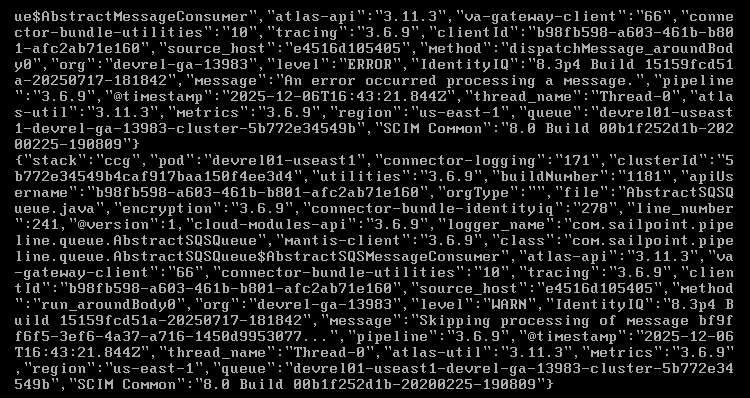
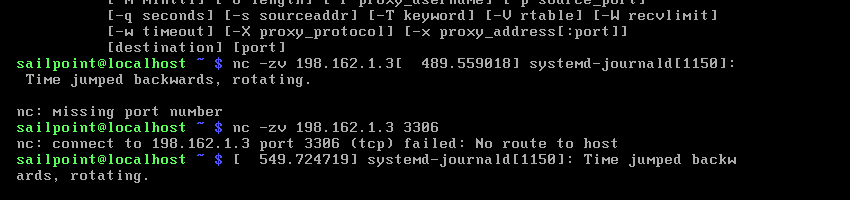
I have installed VMware Workstation Pro on my personal laptop and deployed the Virtual Appliance (VA) on it. The CCG service is up and running, and the VA is successfully connected and visible in the SailPoint UI. However, when I try to test the connection, I encounter a timeout error. Below are the CCG logs for reference.
So I see you have four containers and all four are currently running with no issues, to this point all great.
Therefore, the issue might be internal, could be the port mapping, also the fact that you having timeout error indicates that your trying reach a port, ip that is currently not existing or wrong declared. This is internal mapping, are you using tomcat9 or Jboss?
Heey @gkc123 TCP is failing to connect, as I mentioned on my previous response. This issue is related to poorly port mapping, firewall(could be one thing).
First, start checking if your instance on 198.162.1.3 exists.
If it exists, now check port mapping or firewall restriction on new IPs.
If to this point, 198.162.1.3 return data packages (meaning it’s reachable), and you were able to ssh to 198.162.1.3 and see the desired open ports successfully. Then you would be good to go. To achieve this you DO need to have a intermediate understanding in UNIX.
Please I think my solution has guided you through the steps, help me marking it as solution. So others can find it useful.