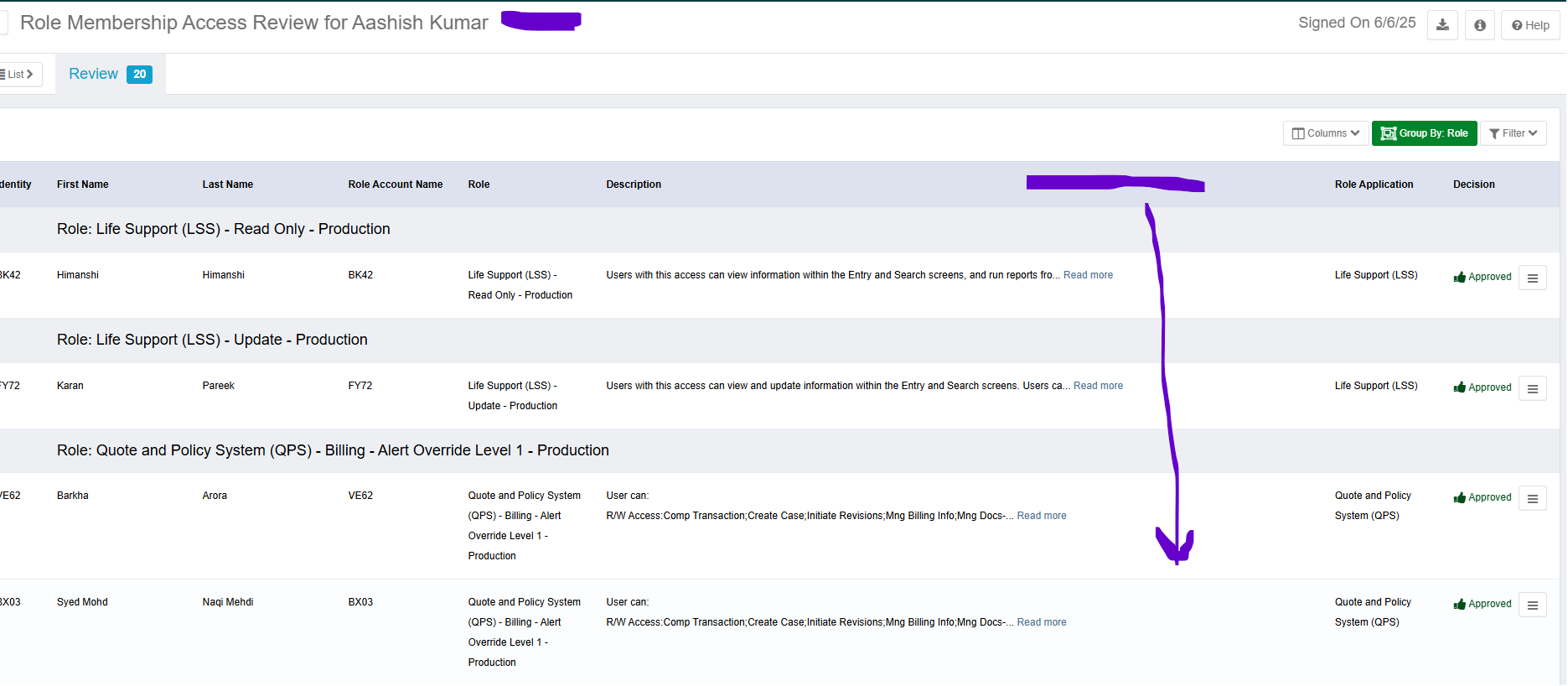
As part of our certification , we need to achieve below.
Additional Column for Managers
The current review screen lacks a column to display manager information.
This omission affects reviews assigned to group owners or non-managerial staff.
Reviewers are finding it challenging to gather all necessary information to complete their reviews.
ACF2ID in Review Title
We kindly request the addition of the actual reviewer’s ACF2ID to the access review title.
This enhancement would:
Facilitate easier follow-ups by the Access Governance team
Improve reporting capabilities
These changes would significantly streamline our review process and enhance overall efficiency. Please see below for a visual of our suggestion…the purple area would be for the Managers name and ACF2ID.
Note : Please advise how can we achieve this in Sailpoint IIQ. Below is the screenshot for your reference. Thanks.
Hello @Venu1010 , Is ACF2ID an identity attribute? If so, you can easily add it to the UIConfig.xml file. You’ll need to select the appropriate XXXXCertificationItemWorksheetColumns option to include this new column.
Let’s decide which certification type you’d like this attribute to appear in. Based on your example, it looks like you’re using uiRoleCompCertificationItemWorksheetColumns. If that’s the case, go ahead and add ACF2ID there, then refresh the access review page to confirm it’s showing up.
Code snippet: // Make sure your identity attribute name matches it.
Hi @Venu1010 Glad to hear that helped! If it solved your problem, feel free to mark it as the accepted solution so others with the same issue can find it easily.