Version
8.4
Screenshot
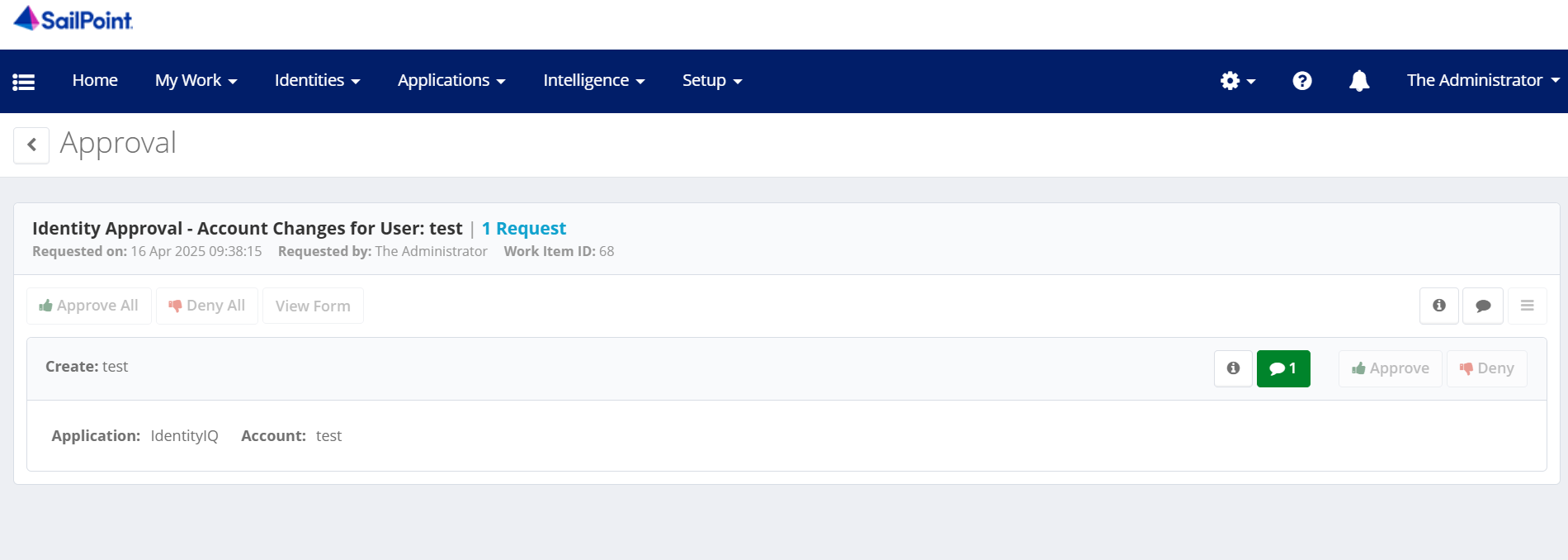
Data
            "approvalItems": [
                {
                    "id": "035c93c3a36a48b7b956f76f7bfc357b",
                    "attributes": null,
                    "owner": null,
                    "sunrise": null,
                    "sunset": null,
                    "sunsetExpired": false,
                    "hadSunriseSunset": false,
                    "commentCount": 1,
                    "assignmentNote": null,
                    "operation": "Create",
                    "decision": null,
                    "itemType": "Account",
                    "application": "IdentityIQ",
                    "nativeIdentity": "test",
                    "accountDisplayName": null,
                    "newAccount": false,
                    "name": null,
                    "value": [
                        "name = \u0027test\u0027",
                        "email = \u0027test@gmail.com\u0027",
                        "manager = \u0027Annabel Stracke\u0027"
                    ],
                    "displayName": null,
                    "displayValue": "email (Email) = \u0027test@gmail.com\u0027, manager (Manager) = \u0027Annabel Stracke\u0027, name (User Name) = \u0027test\u0027",
                    "description": null,
                    "riskScoreWeight": null,
                    "attachmentConfigList": null,
                    "attachments": null,
                    "canViewAttachments": true,
                    "recommendation": null,
                    "classifications": null,
                    "targetItemId": null
                }
            ],
Current UIConfig Entry
This is the current XML config used in UIConfig under the key uiApprovalItemsColumnsEntitlement:
<entry key="uiApprovalItemsColumnsEntitlement">
        <value>
          <List>
            <ColumnConfig dataIndex="operation" headerKey="my_approvals_action_col" hidden="true" renderer="operation" stateId="operation"/>
            <ColumnConfig dataIndex="application" groupProperty="application" headerKey="my_approvals_application_col" property="application" sortProperty="application" stateId="application"/>
            <ColumnConfig dataIndex="name" groupProperty="name" headerKey="my_approvals_attribute_col" property="name" sortProperty="name" stateId="name"/>
            <ColumnConfig dataIndex="accountDisplayName" groupProperty="accountDisplayName" headerKey="my_approvals_account_col" property="accountDisplayName" sortProperty="accountDisplayName" stateId="accountDisplayName"/>
            <ColumnConfig dataIndex="sunriseSunset" headerKey="my_approvals_dates_col" renderer="sunriseSunset" stateId="sunriseSunset"/>
            <ColumnConfig dataIndex="isNewAccount" fieldOnly="true" stateId="isNewAccount"/>
            <ColumnConfig dataIndex="sunrise" fieldOnly="true" stateId="sunrise"/>
            <ColumnConfig dataIndex="sunset" fieldOnly="true" stateId="sunset"/>
            <ColumnConfig dataIndex="hadSunriseSunset" fieldOnly="true" stateId="hadSunriseSunset"/>
          </List>
        </value>
      </entry>
Goal
I want to display the user’s name, email, and manager in separate columns in the approval table.
These values currently live inside the value array of each item, and are also combined in displayValue, but I want to show them as distinct columns.
Document: https://community.sailpoint.com/t5/Technical-White-Papers/UI-Customization-with-UIConfig/ta-p/77539#toc-hId--360153614
Question
How can I extract and display name, email, and manager as separate columns in the approval table, using the UIConfig?