Version: 8.4
Hi everyone,
I would like to ask about the Provisioning Transaction Report in SailPoint. The out-of-the-box report provides provisioning transaction details, but it does not include the Access Request ID. I also need to retrieve the Requester Name and Requester ID.
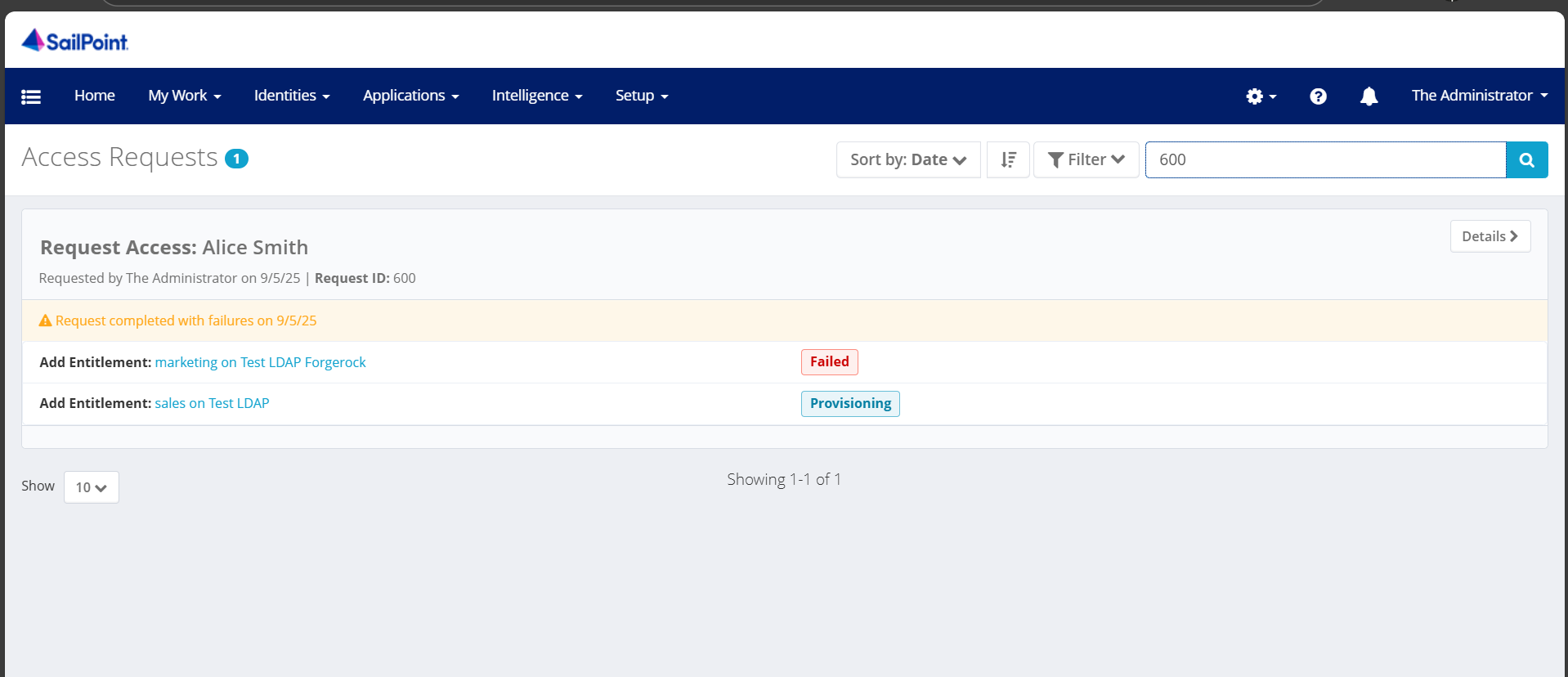
From the screenshot below, I can see that the data is clearly related — the provisioning transaction links back to an Access Request. However, I’m not sure how to write the custom code or customization needed to pull these fields into the report.
Is it possible to customize the Provisioning Transaction Report to include these fields?
My main goal is to retrieve the Access Request ID, so I can cross-reference it and look up full Access Request details.
Thank you so much! 



<TaskDefinition executor="sailpoint.reporting.LiveReportExecutor" name="OOTB Provisioning Transaction Object Report" progressMode="Percentage" resultAction="Rename" subType="Administration Reports" template="true" type="LiveReport">
<Attributes>
<Map>
<entry key="TaskDefinition.runLengthAverage" value="59"/>
<entry key="TaskDefinition.runLengthTotal" value="178"/>
<entry key="TaskDefinition.runs" value="3"/>
<entry key="report">
<value>
<LiveReport title="Provisioning Transaction Object Report">
<DataSource objectType="ProvisioningTransaction" type="Filter">
<QueryParameters>
<Parameter argument="identities" property="identityName"/>
<Parameter argument="applications" property="applicationName"/>
<Parameter argument="integration" property="integration">
<QueryScript>
<Source>
import sailpoint.object.*;
import java.util.*;
if (value != null && !value.isEmpty()){
queryOptions.addFilter(Filter.ignoreCase(Filter.like("integration", value, Filter.MatchMode.START)));
}
return queryOptions;
</Source>
</QueryScript>
</Parameter>
<Parameter argument="accountDisplayName" property="accountDisplayName">
<QueryScript>
<Source>
import sailpoint.object.*;
import java.util.*;
if (value != null && !value.isEmpty()){
queryOptions.addFilter(Filter.ignoreCase(Filter.like("accountDisplayName", value, Filter.MatchMode.START)));
}
return queryOptions;
</Source>
</QueryScript>
</Parameter>
<Parameter argument="status" property="status"/>
<Parameter argument="type" property="type"/>
<Parameter argument="operation" property="operation"/>
<Parameter argument="source" property="source"/>
<Parameter argument="creationDate" property="created" valueClass="daterange"/>
<Parameter argument="forced" property="forced">
<QueryScript>
<Source>
import sailpoint.object.*;
import java.util.*;
if (value == true){
queryOptions.addFilter(Filter.eq("forced", true));
}
return queryOptions;
</Source>
</QueryScript>
</Parameter>
</QueryParameters>
</DataSource>
<ReportForm>
<Reference class="sailpoint.object.Form" id="7f00010196161e778196165f8bf8025c" name="Provisioning Transaction Report Form"/>
</ReportForm>
<Columns>
<ReportColumnConfig field="name" header="report_provisioning_id" property="name" sortable="true" width="110">
<RenderScript>
<Source>
import sailpoint.tools.Util;
return Util.stripLeadingChar(value, '0');
</Source>
</RenderScript>
</ReportColumnConfig>
<ReportColumnConfig field="applicationName" header="report_provisioning_application" property="applicationName" sortable="true" width="110"/>
<ReportColumnConfig field="identityDisplayName" header="report_provisioning_identity_display" property="identityDisplayName" sortable="true" width="110"/>
<ReportColumnConfig field="identityName" header="report_provisioning_identity" property="identityName" sortable="true" width="110"/>
<ReportColumnConfig field="integration" header="report_provisioning_integration" property="integration" sortable="true" width="110"/>
<ReportColumnConfig field="nativeIdentity" header="report_provisioning_native_identity" property="nativeIdentity" sortable="true" width="110"/>
<ReportColumnConfig field="accountDisplayName" header="report_provisioning_account_display" property="accountDisplayName" sortable="true" width="110"/>
<ReportColumnConfig field="status" header="report_provisioning_status" property="status" sortable="true" width="110"/>
<ReportColumnConfig field="type" header="report_provisioning_type" property="type" sortable="true" width="110"/>
<ReportColumnConfig field="operation" header="report_provisioning_operation" property="operation" sortable="true" width="110"/>
<ReportColumnConfig field="source" header="report_provisioning_source" property="source" sortable="true" width="110"/>
<ReportColumnConfig field="created" header="report_provisioning_date" property="created" sortable="true" width="110"/>
<ReportColumnConfig field="forced" header="report_provisioning_forced" property="forced" sortable="true" width="110"/>
</Columns>
</LiveReport>
</value>
</entry>
</Map>
</Attributes>
<Description>Displays provisioning transactions.</Description>
<RequiredRights>
<Reference class="sailpoint.object.SPRight" id="7f00010196161e778196165ef79c005c" name="FullAccessProvisioningTransactionReport"/>
</RequiredRights>
<Signature>
<Inputs>
<Argument multi="true" name="applications" type="Application">
<Description>help_report_provisioning_application</Description>
</Argument>
<Argument multi="true" name="identities" type="Identity">
<Description>help_report_provisioning_identity</Description>
</Argument>
<Argument name="integration" type="string">
<Description>help_report_provisioning_integration</Description>
</Argument>
<Argument name="accountDisplayName" type="string">
<Description>help_report_provisioning_account_display_name</Description>
</Argument>
<Argument name="operation" type="string">
<Description>help_report_provisioning_operation</Description>
</Argument>
<Argument name="source" type="string">
<Description>help_report_provisioning_source</Description>
</Argument>
<Argument name="status" type="string">
<Description>help_report_provisioning_status</Description>
</Argument>
<Argument name="type" type="string">
<Description>help_report_provisioning_type</Description>
</Argument>
<Argument name="creationDate" type="date">
<Description>help_report_provisioning_date</Description>
</Argument>
<Argument name="forced" type="boolean">
<Description>help_report_provisioning_forced</Description>
</Argument>
</Inputs>
</Signature>
</TaskDefinition>

