[Workflow] - Compare String Jsonpath

Hello everyone, how are you?

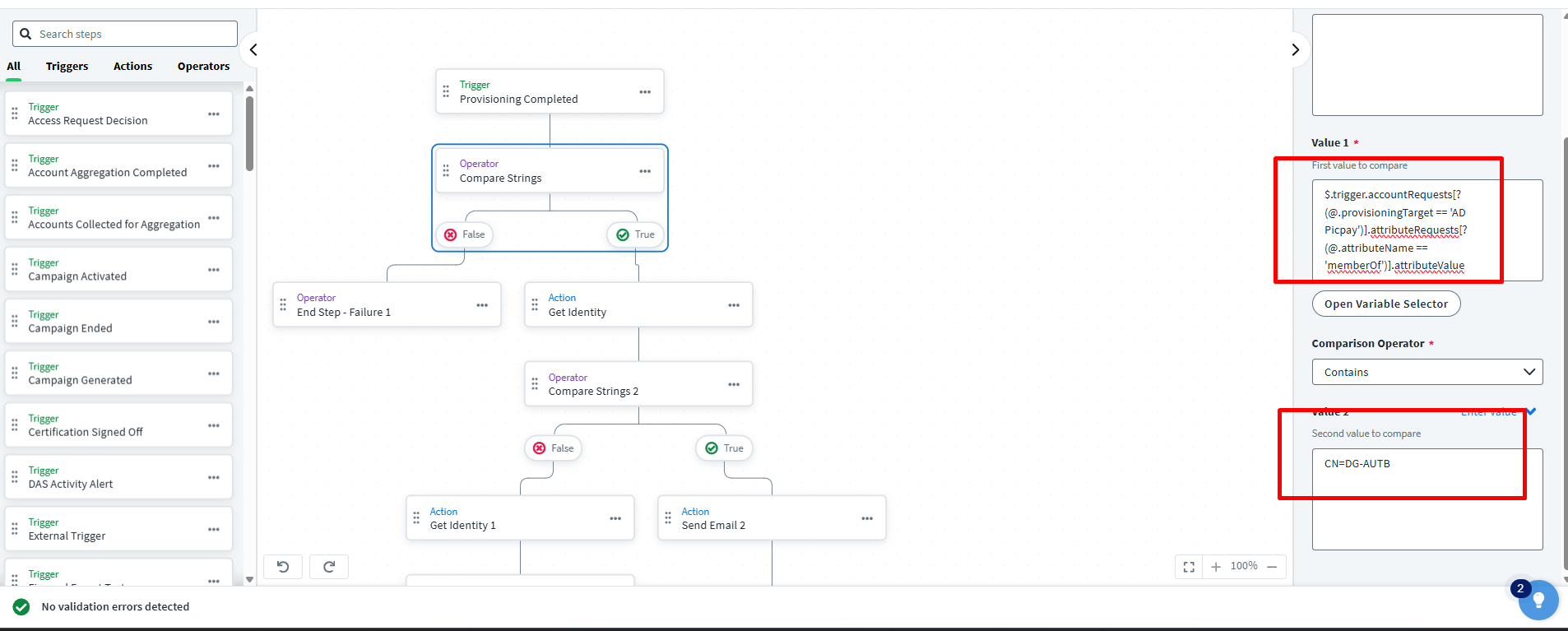
I’m developing a workflow to send an email as soon as access is provisioned.

The problem I’m having is when comparing strings.

$.trigger.accountRequests[?(@.provisioningTarget == ‘AD Picpay’)].attributeRequests[?(@.attributeName == ‘memberOf’)].attributeValue

Contains= CN=DG-AUTB

this access is an Active Directory entitlement

This is the comparison.
See screenshot.
{
  "trackingNumber": "4b4d982dddff4267ab12f0f1e72b5a6d",
  "action": "IdentityRefresh",
  "accountRequests": [
    {
      "accountId": "101843",
      "accountOperation": "Modify",
      "attributeRequests": [
        {
          "attributeName": "detectedRoles",
          "attributeValue": "PERFIL TESTE [AccessProfile-1212as54]",
          "operation": "Add"
        }
      ],
      "provisioningResult": "IdentityNow Task",
      "provisioningTarget": "IdentityNow",
      "source": {
        "id": "IdentityNow",
        "name": "IdentityNow",
        "type": "SOURCE"
      },
      "ticketId": null
    },
    {
      "accountId": "7165",
      "accountOperation": "Modify",
      "attributeRequests": [
        {
          "attributeName": "user_name",
          "attributeValue": "Wander Melchiades Alvarenga ",
          "operation": "Add"
        },
        {
          "attributeName": "user_cpf",
          "attributeValue": "cpf",
          "operation": "Add"
        },
        {
          "attributeName": "user_email",
          "attributeValue": "teste@teste.com",
          "operation": "Add"
        },
        {
          "attributeName": "user_blocked",
          "attributeValue": "0",
          "operation": "Add"
        },
        {
          "attributeName": "user_active",
          "attributeValue": "1",
          "operation": "Add"
        }
      ],
      "provisioningResult": "committed",
      "provisioningTarget": "teste Prod",
      "source": {
        "id": "2c9180857ea260bf017eb159193b0194",
        "name": "Herodash Prod",
        "type": "SOURCE"
      },
      "ticketId": null
    },
    {
      "accountId": "CN=Wander Melchiades Alvarenga,OU=Teste Politica,OU=IDP,DC=br,DC=ppay,DC=me",
      "accountOperation": "Modify",
      "attributeRequests": [
        {
          "attributeName": "memberOf",
          "attributeValue": "CN=DG-AUTB-34-TS-CONSULTAS-HML,OU=GRUPOS,OU=IDP,DC=br,DC=ppay,DC=me",
          "operation": "Add"
        }
      ],
      "provisioningResult": "committed",
      "provisioningTarget": "AD Picpay",
      "source": {
        "id": "2c9180887d727ae5017d76d6c1d141ea",
        "name": "AD Picpay",
        "type": "SOURCE"
      },
      "ticketId": null
    }
  ],
  "requestAction": "Access Request",
  "errors": [],
  "recipient": {
    "id": "73c3662ec35347cb8f47399ad9041932",
    "name": "Wander Melchiades Alvarenga ",
    "type": "IDENTITY"
  },
  "requester": {
    "id": "2c9180887f659866017f75fac5f77e77",
    "name": "OneIDSailpoint",
    "type": "IDENTITY"
  },
  "sources": "teste1, IdentityNow, AD Picpay",
  "finalTrackingNumber": "8522575371804b67bfd452dc08c4358b",
  "warnings": []
}

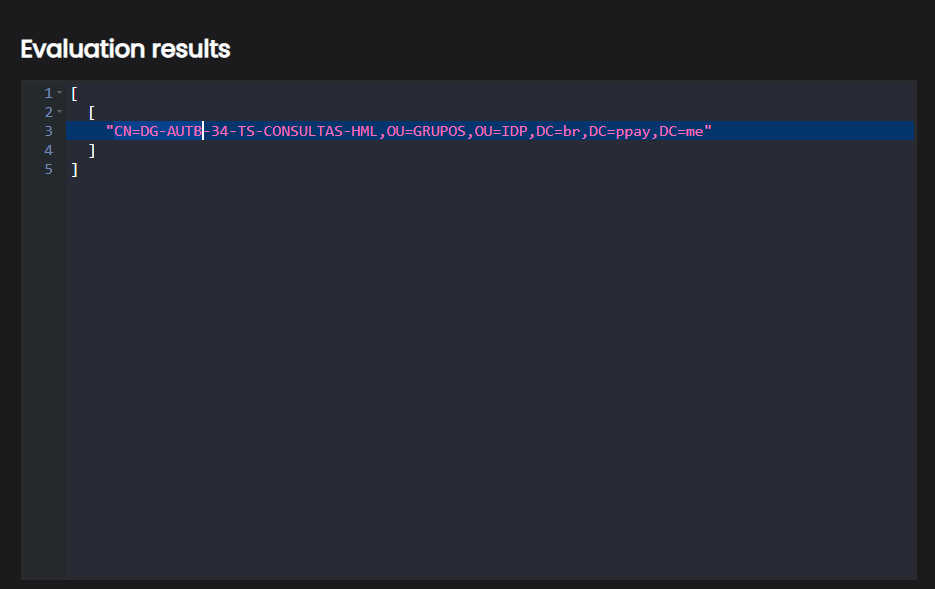
JSONPATH EVALUATOR
Hey @wanderalvarenga!

I don’t see an issue with your trigger or workflow right away from the screenshot. I think it should be working. However, just to check when you posted the “contains” section of the code above you did include an extra white space in front of the CN. Make sure that isn’t the case in ISC or the white space would cause the comparison to fail. Opposite of that you may try to use “Matches” with regex rather than contains. Something like this:

Matches = ".*DG-AUTB.*"

Let me know if this helps.

@kyle_knox
Hello, this space was only used for typing here in the thread. As for the regex, it didn’t work either.

@wanderalvarenga can you share the workflow execution json?

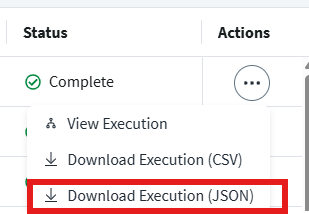
AutbankNotificaoCredenciasExecution20250904.json (9.4 KB)

@wanderalvarenga ok one more longshot idea. I see the JSON path evaluator is returning the attribute value as an array. If this is also happening when ISC evaluates the response then the contains operator may act as if it would on an array rather than a string. For an array it would need to be a complete match at the element level. For a string it would match if there was a match of the characters anywhere in the array.

If you don’t mind to test this try and put the entire string for that entitlement in the value 2 field rather than just the first few characters.

CN=DG-AUTB-34-TS-CONSULTAS-HML,OU=GRUPOS,OU=IDP,DC=br,DC=ppay,DC=me

Then run the test again with the same inputs. If it is treating it as an array then it will match this time since the whole input was given.

Also sorry but maybe try matches again without the quotes:
.*DG-AUTB.*

When I use the JSON Evaluator to slightly modify your JSON PATH to use contains in the path:
accountRequests[?(@.provisioningTarget == "AD Picpay")].attributeRequests[?(@.attributeName == "memberOf" && @.attributeValue Contains "CN=DG-AUTB")].attributeValue

I never get a response. But if I use matches:

$.accountRequests[?(@.provisioningTarget == "AD Picpay")].attributeRequests[?(@.attributeName == "memberOf" && @.attributeValue =~ /.*DG-AUTB.*/)].attributeValue

It works great for me.

Sorry I don’t have access to a tenant right now to help test this myself.

Can you try this and let me know the results? Considering the regex expression that Kyle provided didn’t work. I believe it’s in your json path expression.

$.trigger.accountRequests[?(@.attributeRequests)].attributeRequests[?(@.attributeName==‘memberOf’)].attributeValue

Sorry, I just didn’t understand if I do this directly in the code or on the screen.

@wanderalvarenga I think @kyle_knox is correct. I added a verify data type operator to match string into a test workflow, and it is not a string. I also tried matching/equals/contains on the full value ending in a failure step.

There has to be a way to do this.

I was just using this as an example of what I think is going wrong. But you should try to use “Matches” as the comparison operator and put .DG-AUTB. as the value 2.

Ok, I figured it out. You need the JSON path evaluation to return a single array.

i.e.

[
  "CN=DG-AUTB-34-TS-CONSULTAS-HML,OU=GRUPOS,OU=IDP,DC=br,DC=ppay,DC=me"
]

This is an expression you can use and it should definitely work.

$.trigger.accountRequests[2].attributeRequests[?(@.attributeName=='memberOf')].attributeValue

I’m not sure why that value being nested would cause a contains to fail, but it does. I’m assuming because the first value is an array not a string. I was able to test successfully on my end, albeit on an LDAP source type and not an AD one. It shouldn’t make a difference.

The only hang up would be if the account requests index to that value would ever change. I don’t expect it would, but it’s something to keep an eye on.

I found a way
$.accountRequests[?(@.provisioningTarget==‘AD Picpay’)].attributeRequests[0].attributeValue

Thanks Jonathan Alexander and Kyle Knox

1 Like

This topic was automatically closed 60 days after the last reply. New replies are no longer allowed.