We are working on developing a Workday SaaS connector that will work independently without virtual appliance dependency. However, we are encountering challenges when attempting to integrate multi-value attributes into the Workday source. These attributes are crucial for our business, but they don’t seem to be functioning as expected. I have added these fields to the account schema and marked them as multi-valued. Any assistance would be greatly appreciated.
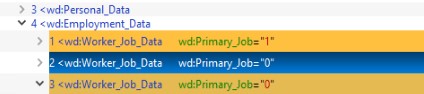
Thank you for your detailed message and explanation. I apologize for the typo in my initial request— the XPath namespace should be wd: for the Workday SaaS connector, not ns1:. I’ve now attached a screenshot of the SoapUI response sample for your reference. Unfortunately, the XPath you provided is not functioning as expected. In our use case, is have to separate the primary location and all other locations. The primary location works correctly when filtering for Primary_Job =“1”. However, we are facing challenges with the additional location(multivalue) where Primary_Job =“0” [*], and we are trying to identify a solution for this.
Note:- I have verified that the attribute in the account schema is marked as multi-valued.
I have gone through the documentation/debug the based on this , i am saying this point. @sivakumarnallu Validate in Postman or browser to verify path correctness.
Use a response path that returns an array of values.