Hi,
I have defined 3 variables in the Templating Context of a Send Email action in a workflow. I am referring to those variables in the email body.
However those variables are not getting replaced in the final email sent to the user.
Email Body:
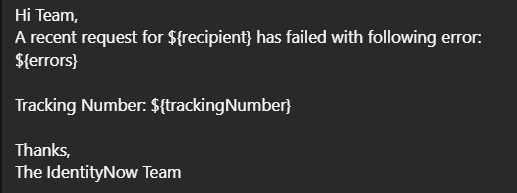
Hi Team,
A recent request for ${recipient} has failed with following error:
${errors}

Tracking Number: ${trackingNumber}

Thanks,
The IdentityNow Team
Templating Context:
{
    "errors.$": "$.trigger.errors",
    "recipient.$": "$.trigger.recipient.name",
    "trackingNumber.$": "$.trigger.trackingNumber"
}
Email sent to the user:
Do anyone have an idea?
Hi @zeel_sinojia ,
Can you check the JSON output for trigger and see the path defined for variables are correct? Also, what’s the trigger you are using?
e.g., If recipient has nested structure, $.trigger.recipient.details.name
I am using Provisioning Complete trigger. Path defined for the variables is also correct.
kdfreeman
(Kapil Dahal)
4
Use double braces in body to get variable from templating context instead of single. {{ }} and check again.
Here, it mentions only single braces are required for referencing the variables.
I made a mistake here. Send Email action was inside a loop. I forgot to pass the trigger variable as loop context.
That resolved my issue. Thanks for all your answers!