Which IIQ version are you inquiring about?
8.3
Please share any other relevant files that may be required (for example, logs).
{
"partitioned": **false**,

"completed": "2025-12-22T03:37:46.098-08:00",

"type": "LCM",

"launched": "2025-12-22T03:37:46.008-08:00",

"pendingSignoffs": 0,

"urn:ietf:params:scim:schemas:sailpoint:1.0:LaunchedWorkflow": {

    "output": \[

        {

            "type": "application/xml",

            "value": "<WorkflowSummary step=\\"Get Identity Access\\"/>\\n",

            "key": "workflowSummary"

        }

    \],

    "input": \[

        {}

    \],

    "workflowSummary": "<WorkflowSummary step=\\"Get Identity Access\\"/>\\n",

    "workflowName": "NBO_WF_GetIdentityApplicationAccess - 12"

},

"meta": {

    "created": "2025-12-22T03:37:46.101-08:00",

    "location": "https://win-fptb5bt20sg/scim/v2/TaskResults/ac100aa19b45199c819b45d9e3750060",

    "version": "W/\\"1766403466101\\"",

    "resourceType": "LaunchedWorkflow"

},

"schemas": \[

    "urn:ietf:params:scim:schemas:sailpoint:1.0:LaunchedWorkflow",

    "urn:ietf:params:scim:schemas:sailpoint:1.0:TaskResult"

\],

"name": "NBO_WF_GetIdentityApplicationAccess - 12",

"messages": \[\],

"attributes": \[

    {

        "value": "<WorkflowSummary step=\\"Get Identity Access\\"/>\\n",

        "key": "workflowSummary"

    }

\],

"id": "ac100aa19b45199c819b45d9e3750060",

"completionStatus": "Success",

"taskDefinition": "Workflow Launcher",

"terminated": **false**,

"launcher": "spadmin"
}
Share all details about your problem, including any error messages you may have received.
The response does not contain the return attribute mentioned in the Workflow*.*
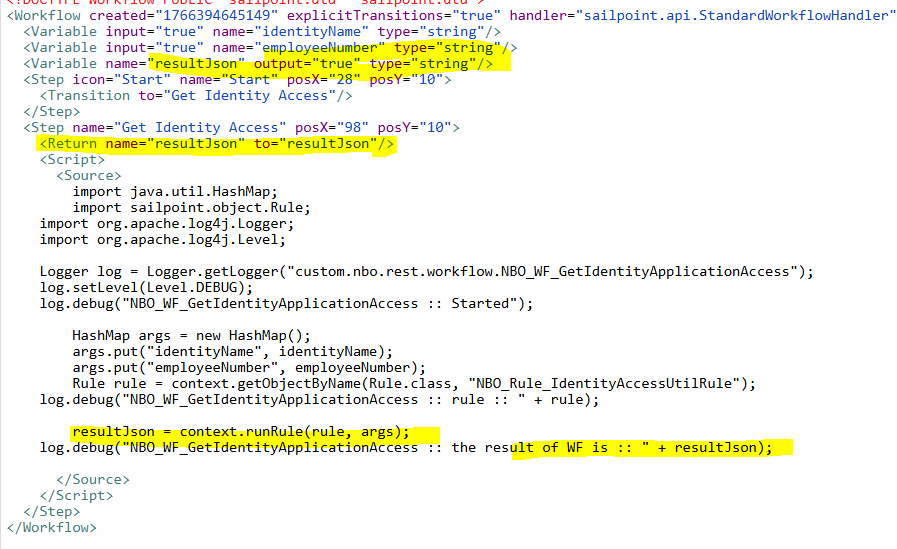
How to get the custom return in response. I checked this post but not sure whether in new versions it is supported or not. SCIM API LaunchedWorkflow Response