brownric
November 7, 2025, 10:07pm
1
8.4 p2
Currently we have a filter for users to not see inactive Identity Cubes in the Request Access screen. We want to add additional criteria to hide Active Identity Cubes where there activePersona (active_persona) only contains Emeritus.
We currently have a Custom Criteria of the following value:
I’ve tried to create a rule to try to filter:
import sailpoint.object.Filter;
import sailpoint.object.Identity;

return Filter.or(Filter.eq(inactive!=true), Filter.and(Filter.eq(inactive==false), Filter.eq(activePersona!=“Emeritus”)));
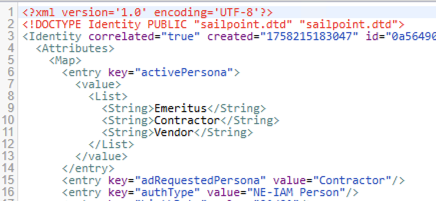
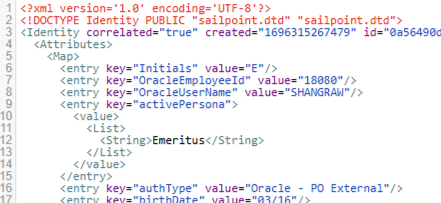
Here is what the data looks like in the database:
When Looking at the identity:
Looking at the identity in the debug pages:
When I try the filter rule, it does hide the inactive identities, but it still shows the identities where the only activePersona=”Emeritus”
Thanks.
I’m thinking it might be because this is a multi-valued searchable attribute. There is a special filter object for that you need to build. See here https://community.sailpoint.com/t5/Technical-White-Papers/Filters-and-Filter-Strings/ta-p/76012#toc-hId--472569354
msingh900
November 8, 2025, 6:22am
3
Hi @brownric
Try using Filter.contains
msingh900
November 8, 2025, 6:28am
4
Use this :
import sailpoint.object.Filter;
import sailpoint.object.Identity;

return Filter.or(
    Filter.eq("inactive", false),
    Filter.not(Filter.contains("activePersona", "Emeritus"))
);
msingh900
November 8, 2025, 4:53pm
5
Let me know if it resolves or not.
brownric
November 10, 2025, 5:49pm
6
I tried that and this and no luck:
import sailpoint.object.Filter;
import sailpoint.object.Identity;
log.warn("Executing on behalf of " + requester.getFullName());

return Filter.or(
    Filter.eq(inactive!=true),
    Filter.and(Filter.eq(inactive==false), Filter.not(Filter.contains("activePersona", "Emeritus")))
);
Thanks.
msingh900
November 10, 2025, 6:13pm
7
@brownric
try this:
import sailpoint.object.Filter;
import sailpoint.object.Identity;

return Filter.or(
    Filter.eq("inactive", false),
    Filter.not(Filter.contains("activePersona", "Emeritus"))
);
brownric
November 10, 2025, 7:42pm
8
That gave the following error:
sailpoint.tools.GeneralException: Cannot invoke “org.hibernate.hql.internal.ast.tree.FromElement.setAllPropertyFetch(boolean)” because “fromElement” is null
Caused by: java.lang.NullPointerException: Cannot invoke “org.hibernate.hql.internal.ast.tree.FromElement.setAllPropertyFetch(boolean)” because “fromElement” is null
msingh900
November 10, 2025, 8:06pm
9
Use this once and let me know:
import sailpoint.object.Filter;
import sailpoint.object.Identity;

log.warn("Executing on behalf of " + requester.getFullName());

Filter filter = Filter.or(
    Filter.ne("inactive", true),
    Filter.and(
        Filter.eq("inactive", false),
        Filter.not(Filter.contains("activePersona", "Emeritus"))
    )
);

return filter;
brownric
November 10, 2025, 10:17pm
10
Same error came back when trying that new rule filter.
brownric
November 10, 2025, 11:11pm
11
Found the solution using this:
IdentityIQ supports querying for objects using Filters. These can be written in Java code (for example, when used in rules or workflows) or in a string-based filter syntax (for example, as a task argument). Searching for identities that have a...
Along with ensuring that other quicklink populations didn’t conflict with the everyone quicklink population.
import sailpoint.object.Filter;
import sailpoint.object.Identity;

String attrName = "activePersona";
String attrValue = "Emeritus";
Filter filter =
Filter.and(
Filter.and(Filter.join("id", "IdentityExternalAttribute.objectId"),
Filter.eq("IdentityExternalAttribute.attributeName", attrName),
Filter.ignoreCase(Filter.ne("IdentityExternalAttribute.value", attrValue))),
Filter.eq("inactive",false));

return filter;</Source>