New Capability: Next-Gen Access Request

:new_button: New Capability

Next-Gen Access Request

Next-Gen Access Request introduces a simpler way to find access, choose recipients, and manage requests in Identity Security Cloud.

What this means for you: Your sandbox tenant receives the new experience automatically on September 28, 2026. Enabling it in production is your decision during a six-month opt-in window that runs October 12, 2026 through February 15, 2027, and on February 16, 2027 all remaining production tenants move automatically. Opting in is permanent — a production tenant cannot return to the legacy experience — so use the sandbox period to evaluate the change and prepare your users. See Action required below for what to do and when.

:speech_balloon: Aha! Ideas Portal

  • GOV-I-2824 New Request Center: Simplify the search
  • GOV-I-2918 Searching for users using attributes outside of display name
  • GOV-I-3693 Search for a department or other identity attribute
  • GOV-I-3918 User search filter when requesting for others
  • GOV-I-905 Find people when multiple identities have the same name
  • GOV-I-4786 AI assistance to simplify access requests

:sparkles: Description

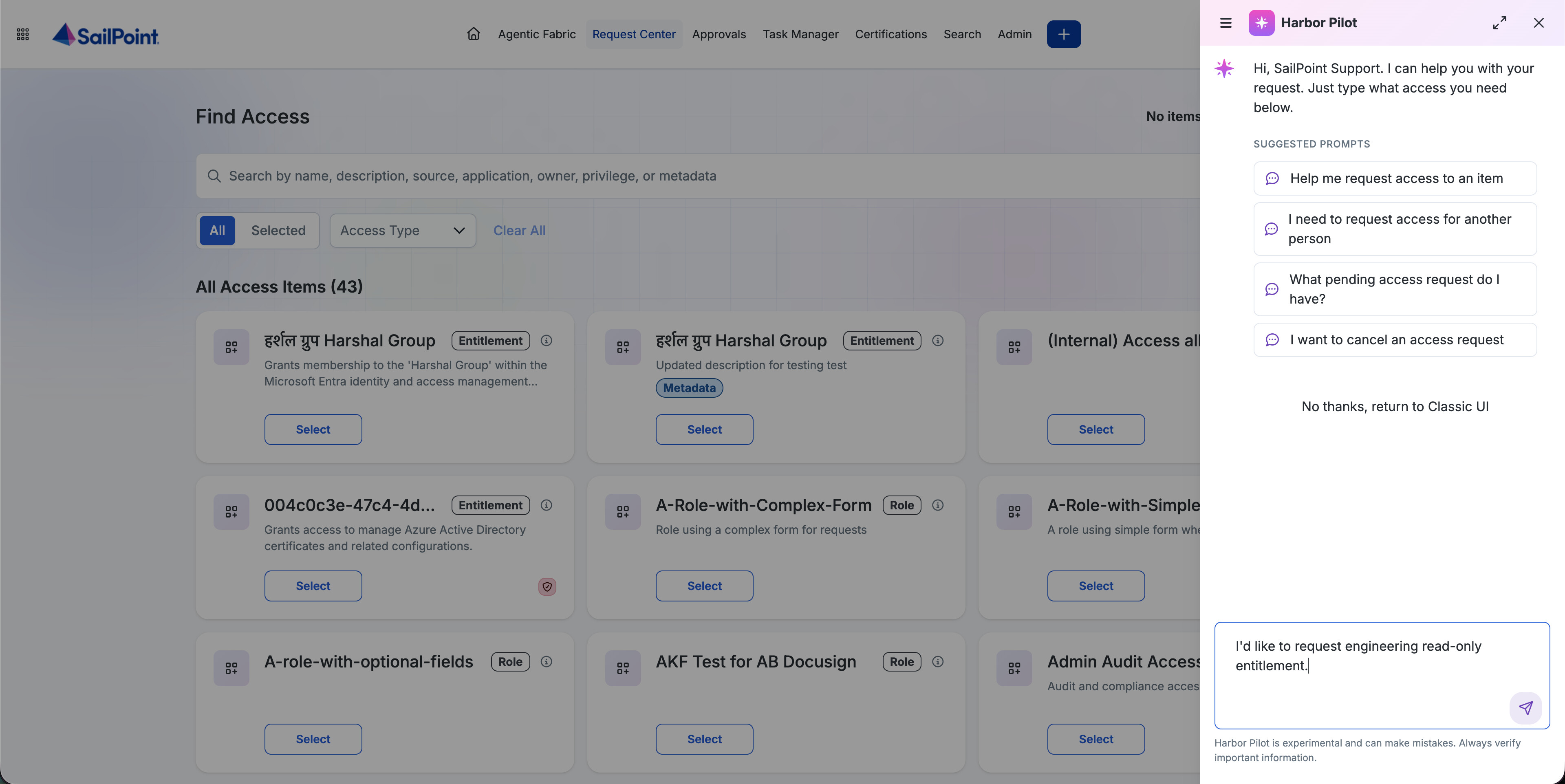
Next-Gen Access Request replaces the current Request Center experience with streamlined access item and identity selection. Requesters can find access and the right recipients in fewer steps using enhanced search and filters. The experience also supports machine identity requests for customers with Machine Identity Security and includes the Access Request Agent for customers entitled to Harbor Pilot.

This is a Request Center experience change only. Existing access items, in-flight requests, and provisioning behavior stay the same.

:red_exclamation_mark: Problem

Today, requesters choose separate paths when requesting access for themselves, for others, or for a team. Catalog search matches only an item name, identity selection relies on a single name-based dropdown, and results do not show enough access item or identity detail.

:light_bulb: Solution

Find access more easily

Find Access searches across name, description, source, application, owner, privilege, and access model metadata. Requesters can filter results by roles, access profiles, entitlements, or applications, and move among the full catalog, Recommended, and selected items. Each card also shows an effective privilege label of HIGH, MEDIUM, or LOW.

Requesters can open an access item to review its description and metadata before adding it to a request.

Request access for others

Requests for others and for a team now enter through one flow. Search identities by name, email, or manager; filter on up to five public identity attributes configured by your administrator; toggle between All and My Team; and select multiple identities.

Request access for machine identities

Customers with Machine Identity Security can select machine identities from a dedicated experience and filter them by owner or type.

Use the Harbor Pilot Access Request Agent

For customers entitled to Harbor Pilot, the Access Request Agent can search in natural language, refine results, support interactive selection, submit requests—including required forms—cancel a request with a reason, and report request status. Approvals in the agent are not available yet.
:busts_in_silhouette: Who is affected?

All Human Fabric and SailPoint Agentic Fabric customers using Identity Security Cloud will receive the new Request Center experience. Machine identity requests require the Machine Identity Security add-on. The Access Request Agent requires separate Harbor Pilot entitlement.

:clipboard: Action required

1. Prepare in sandbox — starting September 28, 2026

All eligible sandbox tenants receive Next-Gen Access Request automatically. No action is needed to enable it. During this period:

  • Familiarize requesters and administrators with the new navigation
  • Update training materials, runbooks, and internal documentation that show the previous layout
  • Configure the public identity attributes used in recipient filters
  • Plan the change management your organization needs before production

2. Decide when to opt in — October 12, 2026 through February 15, 2027

Enabling Next-Gen Access Request in production is your decision during this six-month window. Watch for the in-product opt-in prompt and notifications in your tenant. SailPoint is providing this window so administrators can choose the right timing for their users rather than absorbing the change on a fixed date.

:warning: Opting in is permanent. Once a production tenant opts in, it cannot be rolled back to the legacy experience. Evaluate the new experience in sandbox and complete your change management before you enable it in production.

3. Automatic move — February 16, 2027

All remaining production tenants move to Next-Gen Access Request. If you have not opted in by February 15, this happens for you.

Also note: all new access request functionality will be delivered only in Next-Gen Access Request going forward. The legacy experience will not receive new capabilities.

:date: Important dates

Milestone Date
Early access availability September 8, 2026
Sandbox tenant availability September 28, 2026
Production opt-in period October 12, 2026–February 15, 2027
All production tenants moved February 16, 2027

:books: Resources

Product documentation will be available by sandbox availability on September 28, 2026.

5 Likes

I see some really great things here! One thing I am curious about is if there will there be a capability to switch from a “card” view to a “list/table” view? Customers with large catalogs will be scrolling for days if they have to look through cards.

1 Like

Good improvements with the new access request flow. I have a few questions:

  1. Will the new flow allow users to select only the access that is not already assigned to them? In the current access request flow, the requester is not notified when the selected access is already assigned. The request can still be submitted and is later cancelled. It would be helpful if the new flow could prevent or clearly indicate duplicate access requests before submission.

  2. As mentioned above, is it possible to display the catalog items in a list view instead of cards? In some customer environments, there can be a large number of catalog items, and a list view may make it easier to browse and manage them.

  3. The new flow mentions that users can now be searched using additional attributes. Could you please confirm which user attributes are searchable and can be used to find users?

4 Likes

Hi Jill, thank you for your feedback! Our new UI still prioritizes showing more details in each tile, such as descriptions, Metadata badge, and Privilege badge, but I believe it still shows more items (9 items on a larger screen) than the current legacy request center (4 items), so I hope this is still good progress!

That said, a list/table view is not currently planned. I have noted your feedback as future reference in case others raise similar requests!

1 Like

Hi UDAY, thank you for your feedback!

  1. This behavior doesn’t change even in Next-Gen Access Request. That said, we are considering your suggestion (showing which items are already assigned to them) as part of our roadmap, but the exact timeline is still TBD.

  2. Please refer to my response to Jill above. A list view is not currently planned, but I noted it as a future reference.

  3. Search checks identity name, email, and manager. Beyond that, an ISC admin can configure up to five additional public identity attributes as filters on the Identity Selection screen. (Note there is currently no admin UI for this, it’s set through the public-identities-config API.) As an example, in the attached screenshot, “Job Title,” “Location,” “Country,” and “Region” are four of those configured attributes.

1 Like

I also have questions about this new UI:

Will it be finally possible to link directly to an access profile/entitlement within request center?

Will it be possible to disable start/end date on access profiles/entitlements?

1 Like

Linking to an AP directly would be quite nice!

Also, is there any plan to allow to filter which metadata gets displayed? Some of it is technical in nature in our tenant, and will only confuse end-users.

Additional comment after experimenting with it:
for a “My Team” use case, the Request Center currently selects all team members by default.
In the new UI, the MyTeam filters to the identities in one’s team but then one has to select each of them one by one. A “Select all” button would be nice for this specific use case.

It could also serve when searching for e.g. AP and wanting to select all search results (e.g. select “AppA - Terminator2”, “AppB -Terminator2”, … after searching “Terminator2”).

It’s definitely not the most common use cases, but for a team manager with 10+ team members, clicking on each tile will become painful early on.

1 Like

Is anyone else experiencing issues with the “Request for Others” flow? I have “By Everyone for Anyone” enabled in the global settings, yet when logging in as an end user, they are only presented with their own identity to select if they choose “For Others”.

This model presents a significant usability concern for our organization. Our business users should not need technical knowledge to understand how to request access.

Today, users are accustomed to a simple experience: open the Request Center, search for the application, and select the appropriate access. Requiring additional navigation while exposing users to hundreds of access cards makes the process significantly more difficult and less intuitive. Users will need extensive training to just click the access type and select applications.

For an organization supporting a large non-technical user population, this change would be a major step backward in the access-request experience. We need the ability to provide users with a simple, application-focused request experience that limits unnecessary options and helps them quickly identify the access relevant to them.

4 Likes

Hi @lukas_ceremeta , thank you for the questions!

We still don’t have deep links to specific access items. But we are planning to implement pre-defined filters as URL parameters like /request-access/for-self/find-access?search:XYZ&access-type:entitlement in the future. That might help you direct your end-users to specific access items faster.

You can set start/end date as either optional or required, but can’t completely disable it. We’d love to hear if you have a specific use case to disable the start/end date!

Hi @christophe_choumert , thank you for your questions and feedback.

  • Deep link to a specific access item: We still don’t have deep links to specific access items. But we are planning to implement pre-defined filters as URL parameters like /request-access/for-self/find-access?search:XYZ&access-type:entitlement in the future. That might help you direct your end-users to specific access items faster.
  • Metadata filter: This is my first-time hearing this feedback. I have noted it as a consideration.
  • Select all: This has been added to our roadmap.

Again, thank you for your inputs on Next-Gen Access Request!

Hi @chrishogan , thank you for the question. “Request for Others” flow is working as expected in my demo tenant. Please raise a support ticket if the issue persists!

Hi @andrea_ortega , thank you for the feedback. We’ll definitely consider how we can better support application-centric access request user flow.

@andrea_ortega , nothing should change in that regard for your users.

They can still select the application category under the “Access Type” dropdown. That still allows you to select entitlements, roles, access profiles or applications.

Hi Takahiro,

there are ideas on idea portal for this https://ideas.sailpoint.com/ideas/GOV-I-2770. For us specifically, people select it by mistake or some access just isnt designed to be time limited or it is managed via certification campaigns.

@hrv1 , I support @andrea_ortega 's feedback 100%.
Yes, you are correct, users can still filter to see only Applications, but most users won’t know that they need to do that or how to do that. This requires additional learning curve and is not intuitive for non-tech users.
This has a very simple resolution - tenant-wide setting for default view of the request center - administrators should be able to chose what users see by default from the filters - ALL; Only one of the options (e.g. Applications); Combination of the options. In other words, let organizations choose the predefined filter, do not enforce one on them, as different orgs and userbases would require different experience.
In our case, where we have the entire access model and SailPoint experience revolving around the concept of 1. Select the application your need; 2. Select the access profile from this application; this change will throw end-users into chaos.
This feedback has already been shared with our customer success manager and I strongly believe SailPoint should consider customer feedback and adjustments to the new engine in the remaining time before mandatory rollout in February.

1 Like

I basically have the same comment as Andrea Ortega.

This new request center isn’t feasible for us without training end users, whereas a request center should be intuitive and provide more guidance to the end user, so that training isn’t necessary.

It would be great if we could potentially customize the request process ourselves within our own tenant. Since we also follow this approach: first find the application, then the required permissions.

1 Like

I agree with Andrea and Leonie.

Our users are accustomed to the current Request Center experience and navigation model. Implementing this change as proposed would remove capabilities they rely on today and is likely to generate a significant number of unnecessary support tickets from users who believe their access has been lost or who are unable to locate applications and entitlements as they do today.

We strongly believe this should be a configurable option, allowing each customer to decide whether to adopt the new model based on their business needs and change readiness.

Additionally, this change would impact both existing and future application onboardings, requiring reviews and potential adjustments across our catalog. At this stage, I do not see a clear benefit that would outweigh the disruption to the user experience. From our perspective, it represents a step backward in terms of usability and user adoption.