I am getting error while account creation on Active Directory, it is working in Sandbox.
Error : Account created but some attributes are not updated properly.
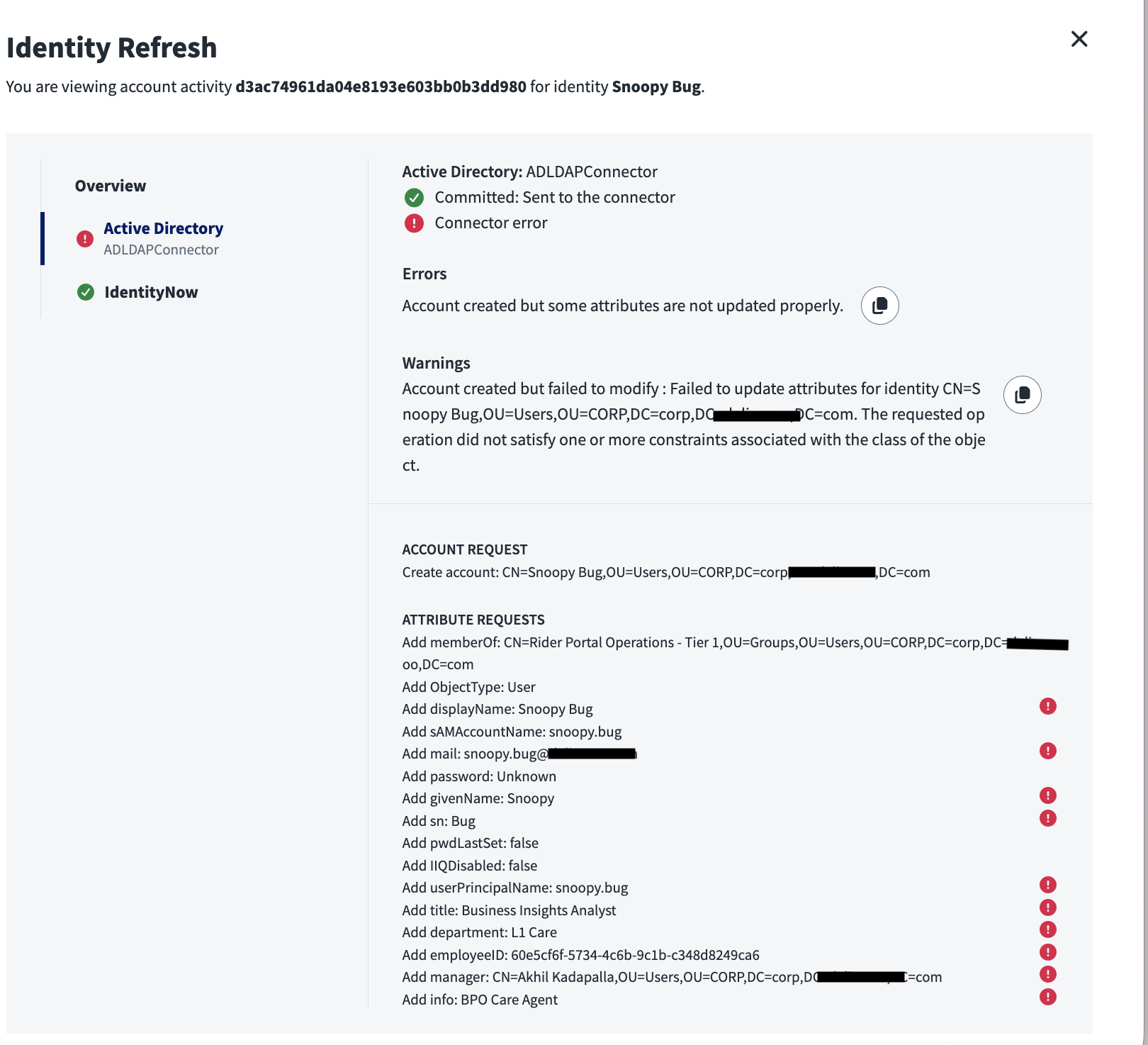
Hi @shikhadeliveroo Check your UPN generation, doesn’t appear to have email type syntax
Hi @shikhadeliveroo,
The error you are encountering indicates that the value provided for one or more attributes does not meet the required criteria. This could be due to the password policy not being satisfied, the specified manager not existing in Active Directory, or issues with other attributes as well.
Also your employeeID looks too long
This is a common error Active Directory–related issue.
To debug the problem, please check the following:
Step 1: Identify the mandatory attributes required on the Active Directory side.
Step 2: Verify what attribute values your plan/provisioning request is sending to Active Directory.
Step 3: Using the same set of values, try creating an Active Directory account manually.
This will help determine whether the failure is due to missing or invalid mandatory attributes being sent to Active Directory.
This seems like an issue with the password policy, but a good way to trouble shoot is to turn off the non-mandatory attributes and test a create. Then one by one turn the others on, until you figure out which caused the error.
If it is the password policy, check those settings in the tenant and make sure they match the requirements you have in AD.
Hello,
It`s your employeeId it has a limit of 16 characters!!